1. Under the Accounting section, in the Journal Entry program click "Add Journal Entry"

2. Enter the Journal Name manually or click the Next Journal button to automatically generate one.

3. Click "Save"

4. Enter the GL Account Number, Amount, Description and/or other information about the GL Posting you are wanting to make.

5. Click "Add Detail To Journal"

6. Click "Add Detail To Journal"

7. Review the journal entry to ensure the debits and credits balance.

8. Click "Post to General Ledger"

9. Click "Yes"

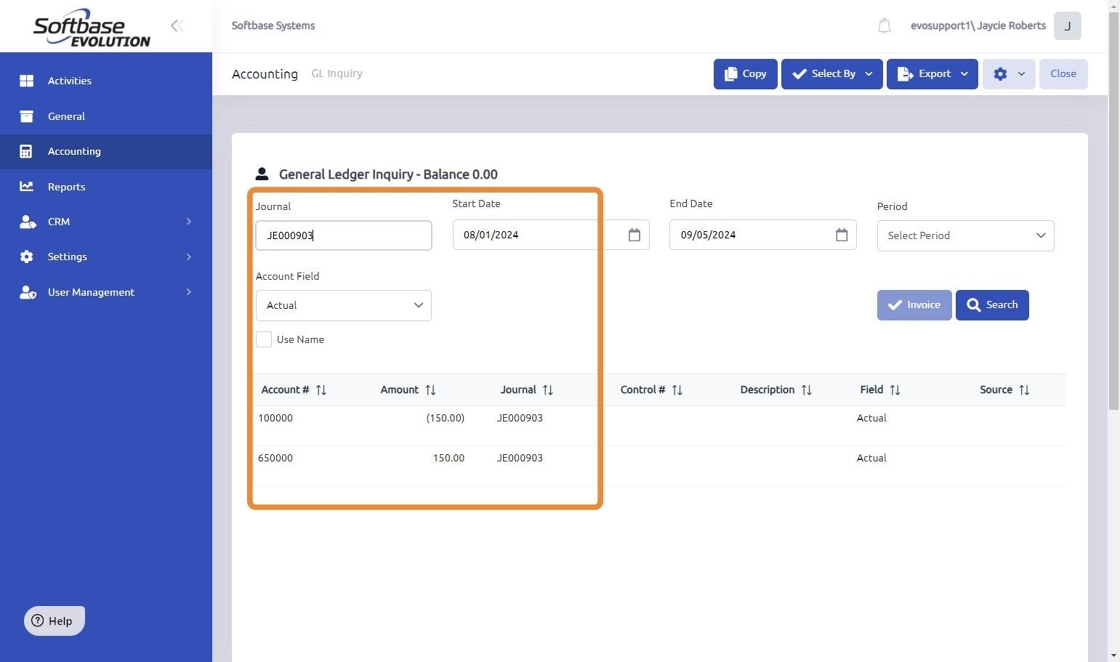
10. Once the Journal Entry is posted to the General Ledger you will see the balanced entry in the GL Inquiry program.
Was this article helpful?
That’s Great!
Thank you for your feedback
Sorry! We couldn't be helpful
Thank you for your feedback
Feedback sent
We appreciate your effort and will try to fix the article