Clear All Permissions in Excel for Odata Updates
Overview
This article provides an overview of how to clear all of the existing login permissions in Excel that is used when loading data from an Odata Query. This may be required to do when a report is shared out and is asking for a login when trying to refresh and is giving an error for invalid credentials
Steps
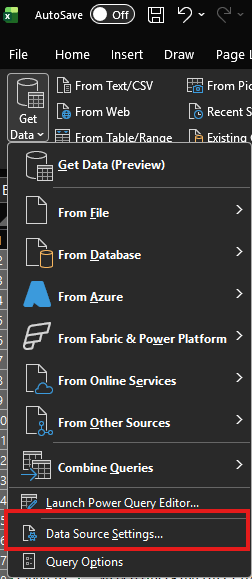
Go to Data -> Get Data - > Data Source Settings
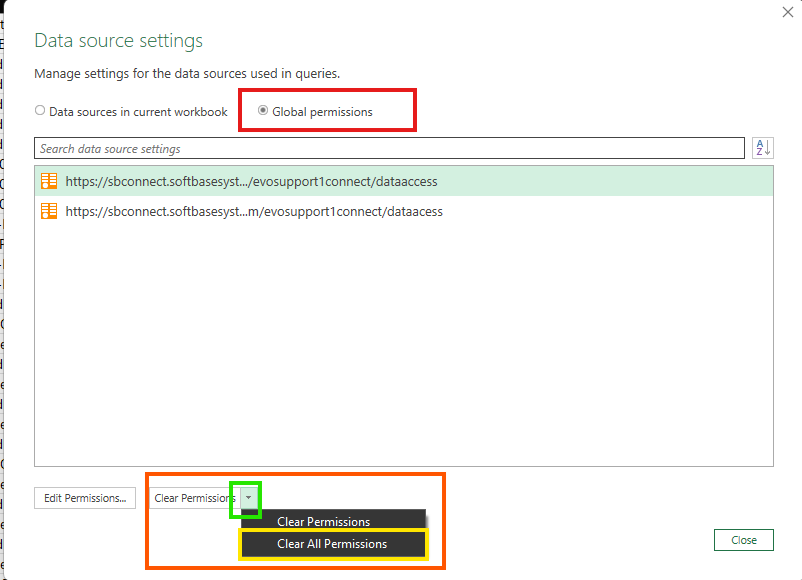
Select Global Permissions radio button -> Take the drop down arrown next to Clear Permissions -> Click Clear All Permissions
Was this article helpful?
That’s Great!
Thank you for your feedback
Sorry! We couldn't be helpful
Thank you for your feedback
Feedback sent
We appreciate your effort and will try to fix the article