Part 1: AR Invoice and AR Deposits
Summary
The System can be configured to support customers that transact in a foreign currency while the dealership continues working from its base pricing structure.
A common example is a Mexico-based dealership that maintains pricing, inventory list values, and markups in MXN, while billing a customer in USD. In that workflow, the dealership user may enter pricing in MXN, the customer-facing document may display the translated amount, and the related receivable and payment activity may flow through the matching foreign currency accounts.
This article explains how that setup can be configured and how it functions within:
- AR Invoice
- AR Deposits
This article covers:
- Currency Setup
- Branch Setup
- COA Setup
- Common accounts used
- Customer Setup
- AR Invoice flow
- AR Deposit flow
- Example transaction behavior
Bellow in Part 2 of this article we expand on the setup needed for:
- AP Invoice
- AP Payment
- Additional foreign currency workflows
Example Used in This Article
To keep the process consistent, this article uses the following example throughout:
- Dealership base currency: MXN
- Customer currency: USD
- Exchange rate: 1 USD = 17.50 MXN
In this example:
- the dealership is based in the Mexico and maintains its pricing in MXN
- the customer is billed in USD
- the system uses the related foreign currency AR and bank accounts to support that process
How This Workflow Functions
In this setup, the dealership user enters pricing in the dealership’s base currency.
The system then uses the currency setup to:
- translate the customer-facing document amount into the customer’s foreign currency
- route the receivable through the related foreign AR accounts
- receive the customer payment into the related foreign bank account
- apply the Exchange Gains and Losses account if a settlement variance occurs
One important concept in this structure is that the foreign AR account and the related AR FX Adjustment account are intended to work together as part of the overall receivable structure.
Section 1: Currency Setup
Purpose
Currency Setup defines the foreign currency and exchange-rate behavior used by the system.
Example Setup
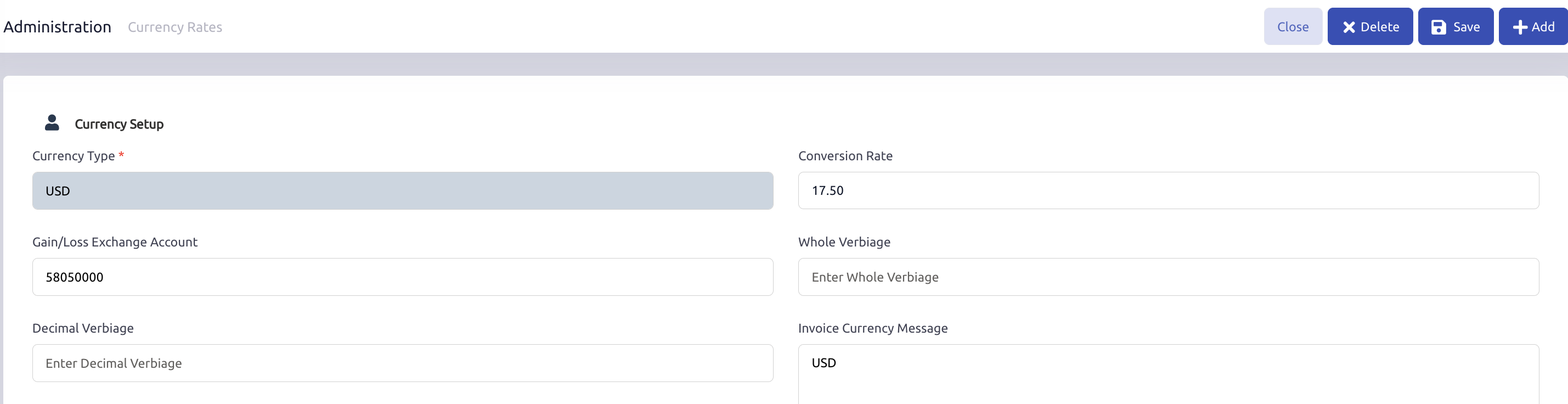
For this example, the currency setup could include:
- Currency Type: USD
- Exchange Rate: 1 USD = 17.50 MXN
- Exchange Gains and Losses Account: 58050000 Exchange Gains and Losses
Result
This setup allows the system to:
- recognize USD as a valid foreign currency
- translate customer-facing document values into USD
- use the gain/loss account when an exchange-related variance occurs at settlement
Notes
The exchange rate maintained here affects how the customer-facing amount is translated.
In this article, the example is expressed conceptually as:
- 1 USD = 17.50 MXN
- Conversion Rate of 17.50
If your live environment stores or interprets the rate differently, that can be confirmed through testing.
Section 2: Branch Setup
Purpose
Branch Setup determines which AR structure is used for standard customers and foreign currency customers.
Example Setup
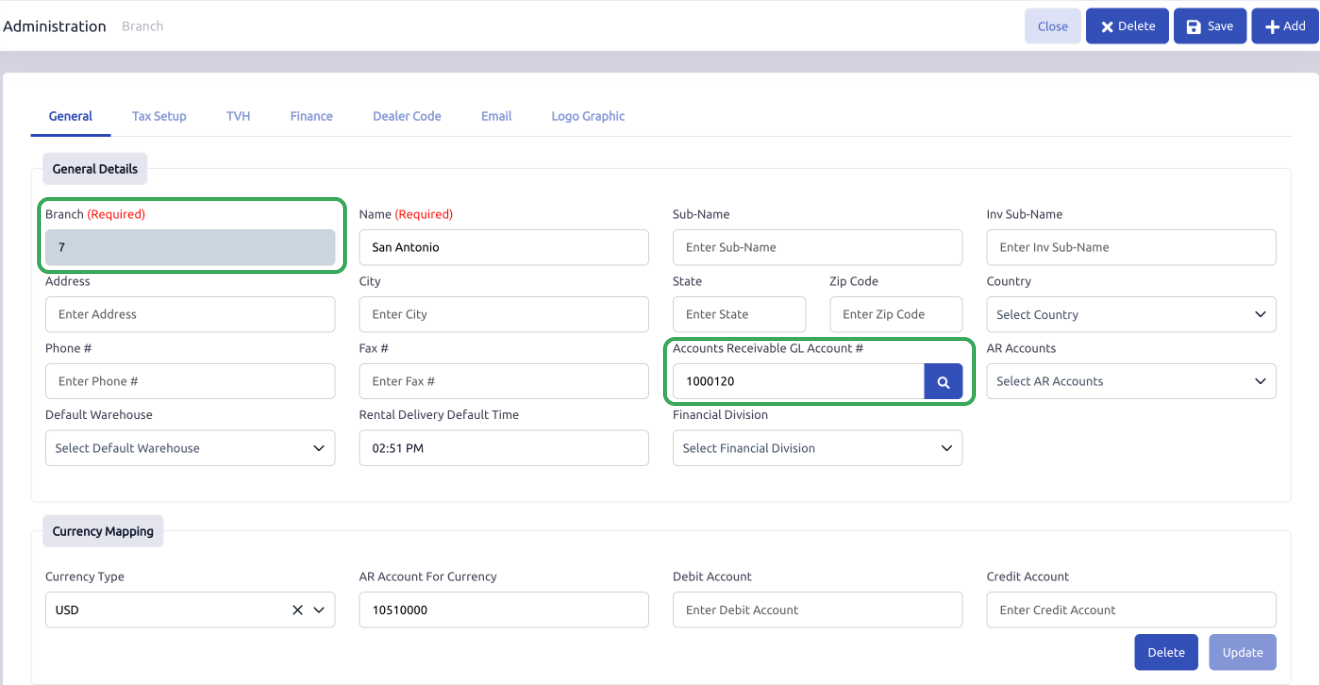
On the branch record:
Default AR Account
- 1000120 A/R Base MXN
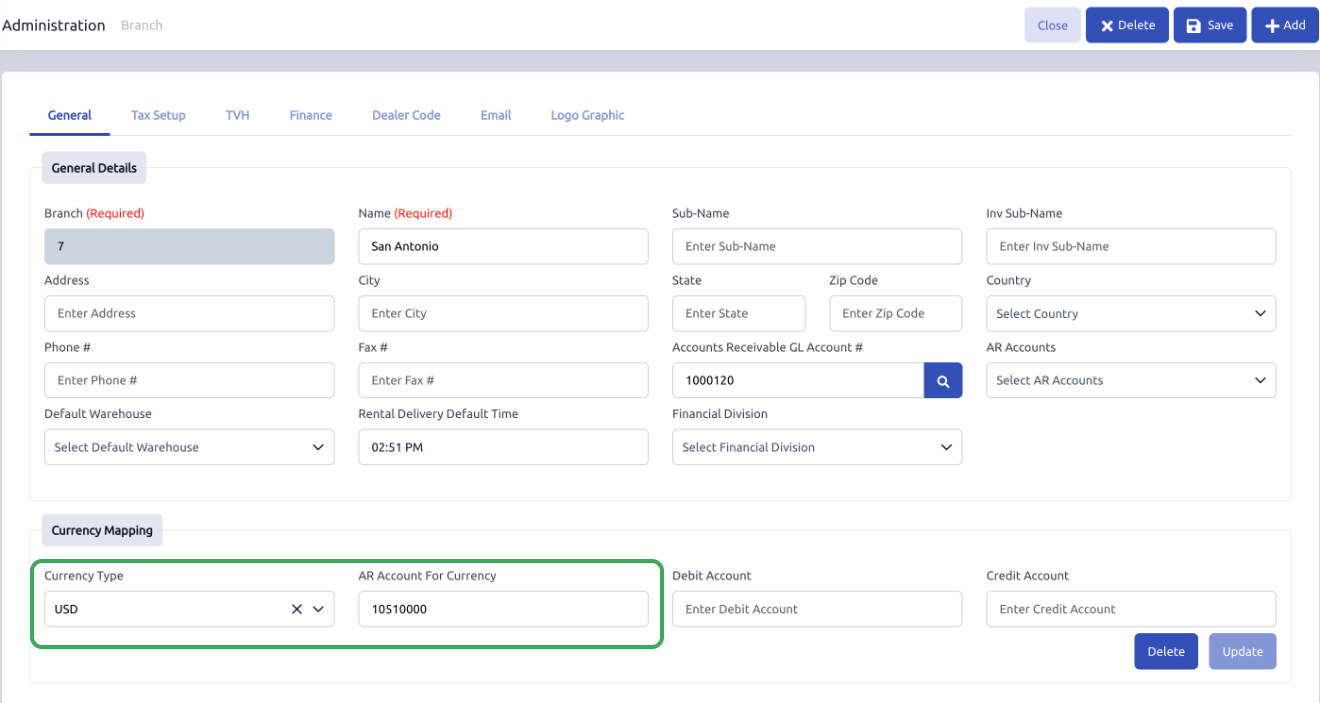
USD-specific AR setup
- Currency Type: USD
- AR Account: 10510000 A/R USD
Result
With this setup:
- customers without a foreign currency assignment continue using the normal base AR account
- customers assigned USD can use the USD-specific AR structure
This allows the branch to support both standard base-currency receivables and foreign-currency receivables.
Section 3: COA Setup
Purpose
The Chart of Accounts provides the accounts used by the foreign-currency receivable and bank structure.
Common Accounts Used ( Example Reference Only )
Base AR
- 1000120 A/R Base MXN
- Type: Asset
Foreign AR
- 10510000 A/R USD
- Type: Asset
Foreign AR FX Adjustment
- 10570000 A/R USD FX Adjustment
- Type: Asset
Foreign Bank
- 10450000 USD Bank Account
- Type: Asset
Foreign Bank FX
- 10440000 USD Bank FX
- Type: Asset
Exchange Gain/Loss
- 58050000 Exchange Gains and Losses
- Type: Expense
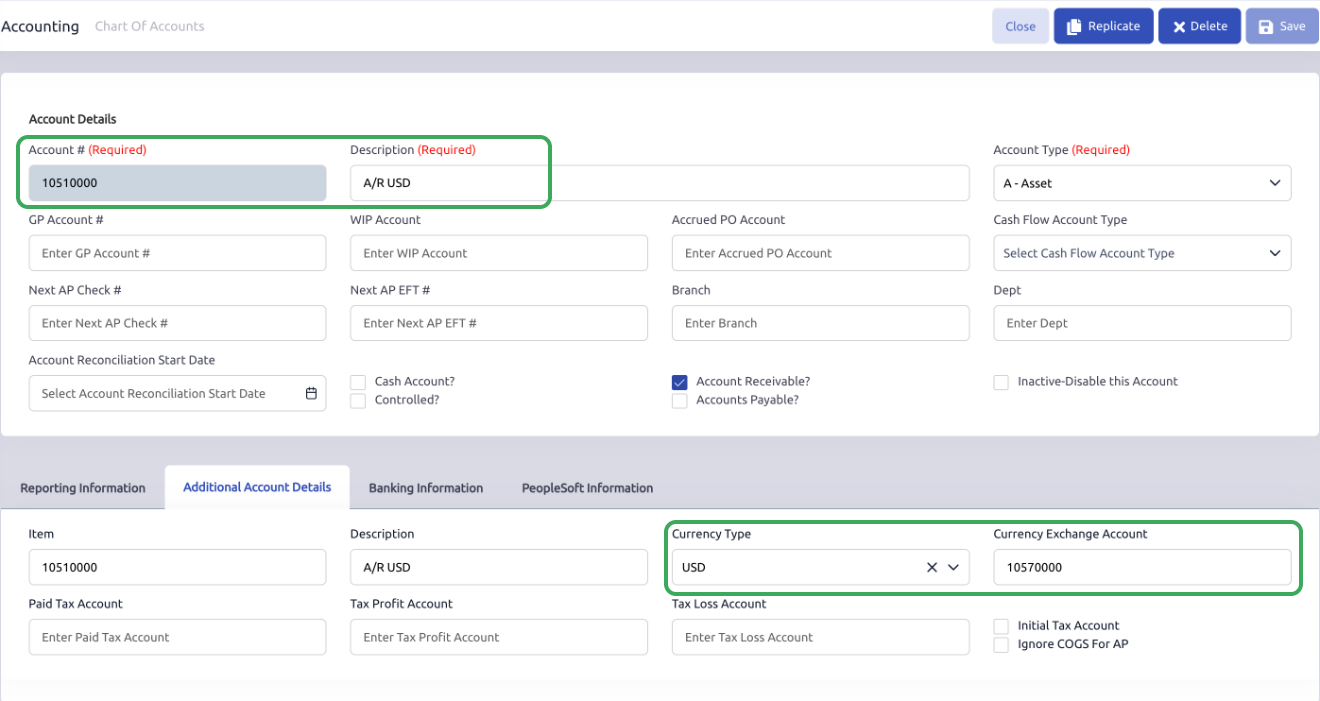
COA Setup Example for A/R USD
10510000 A/R USD
- Currency Type: USD
- Currency Exchange Account: 10570000 A/R USD FX Adjustment
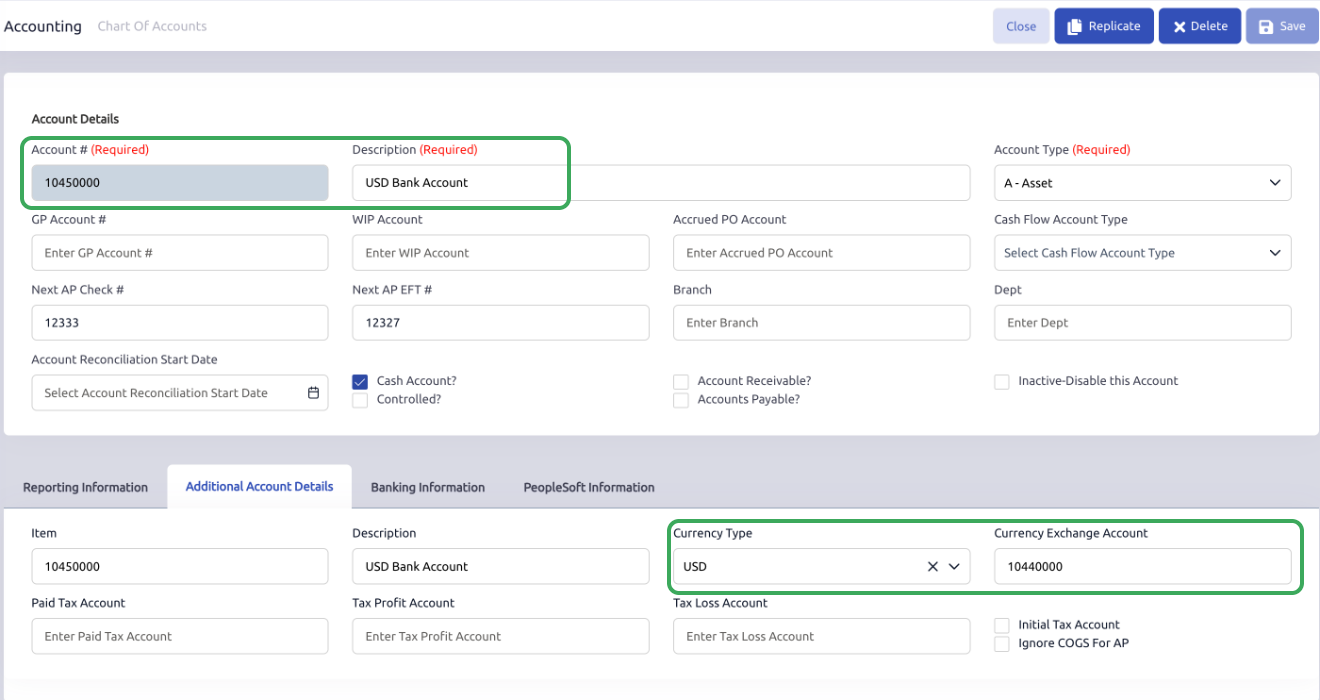
COA Setup Example for USD Bank Account
10450000 USD Bank Account
- Currency Type: USD
- Currency Exchange Account: 10440000 USD Bank FX
How to Understand These Accounts
In this structure:
- A/R USD represents the foreign receivable side
- A/R USD FX Adjustment works with that account as part of the translated AR structure
- USD Bank Account receives the foreign customer payment
- USD Bank FX supports the foreign bank structure
- Exchange Gains and Losses may be used when a settlement variance occurs
Because of that, the foreign AR account is not intended to be read entirely on its own. It works together with the related FX Adjustment account.
Section 4: Customer Setup
Purpose
The customer record identifies the customer as a foreign-currency customer.
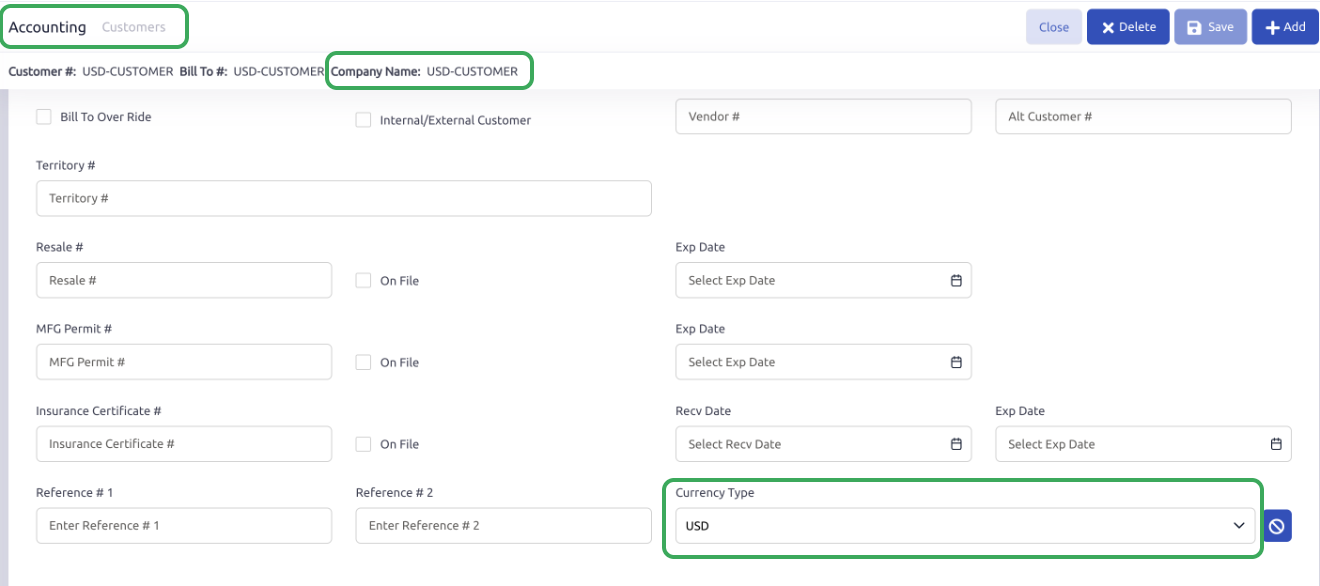
Example Setup
On the customer record:
- Customer Currency Type: USD
Result
Once the customer is assigned USD:
- the customer can be billed through the USD currency structure
- the branch can use the USD-specific AR setup
- the document preview can display the translated USD amount
Section 5: AR Invoice Workflow Example
Scenario
Assume the following:
- Base currency: MXN
- Customer currency: USD
- Exchange rate: 1 USD = 17.5 MXN
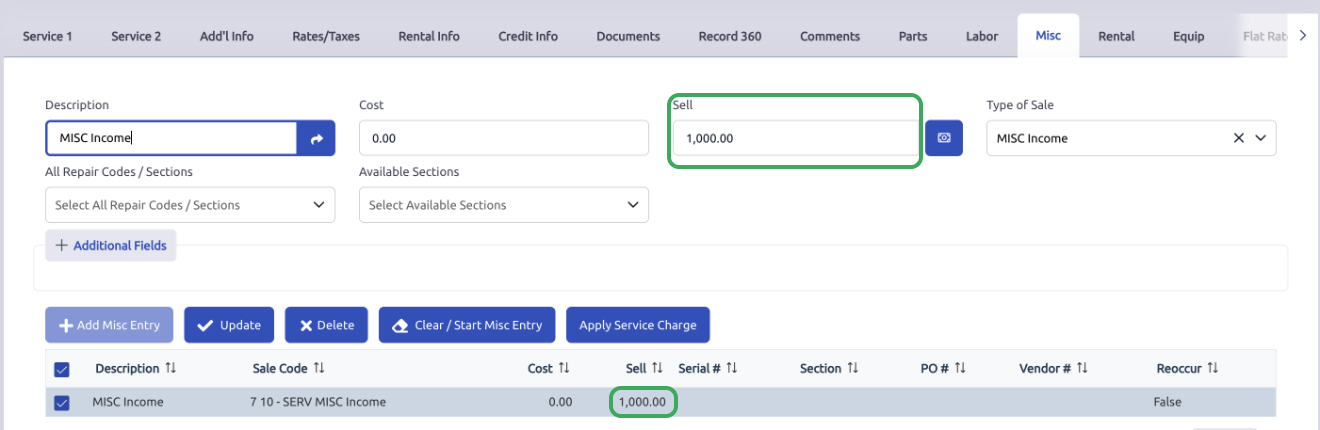
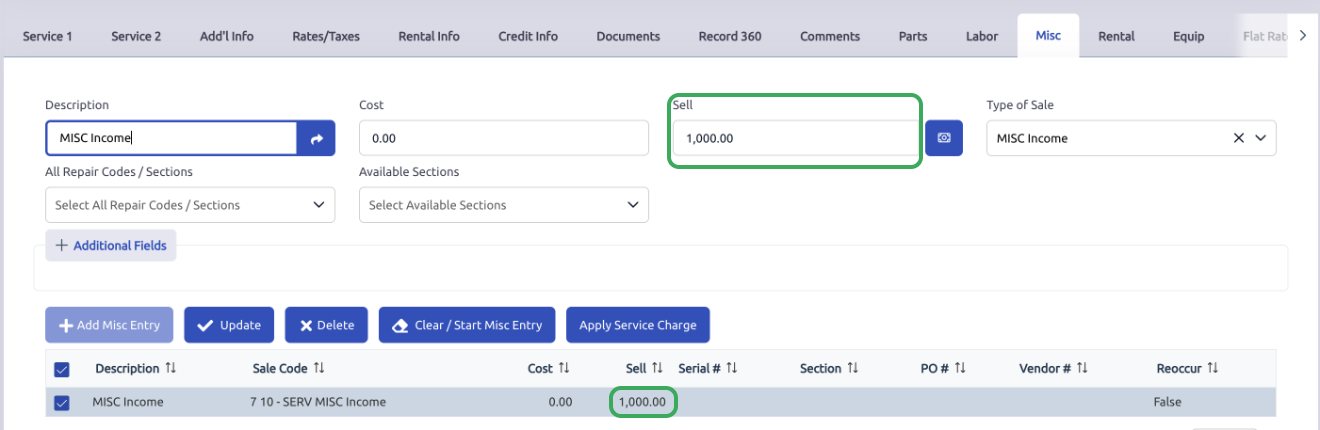
- User enters a MISC line item
- Sell amount entered by user: 1,000 MXN
Step 1: User Enters the Invoice Line
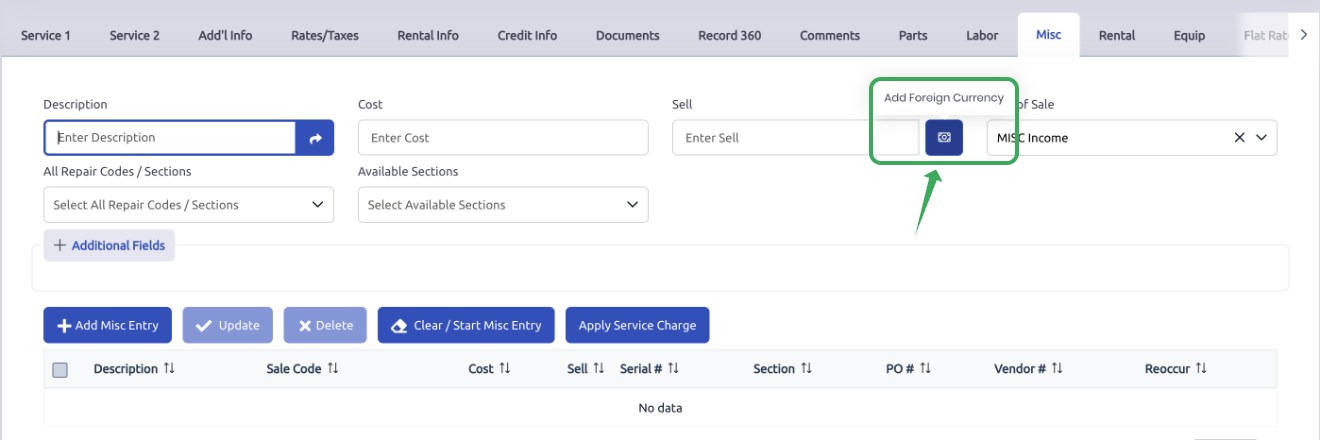
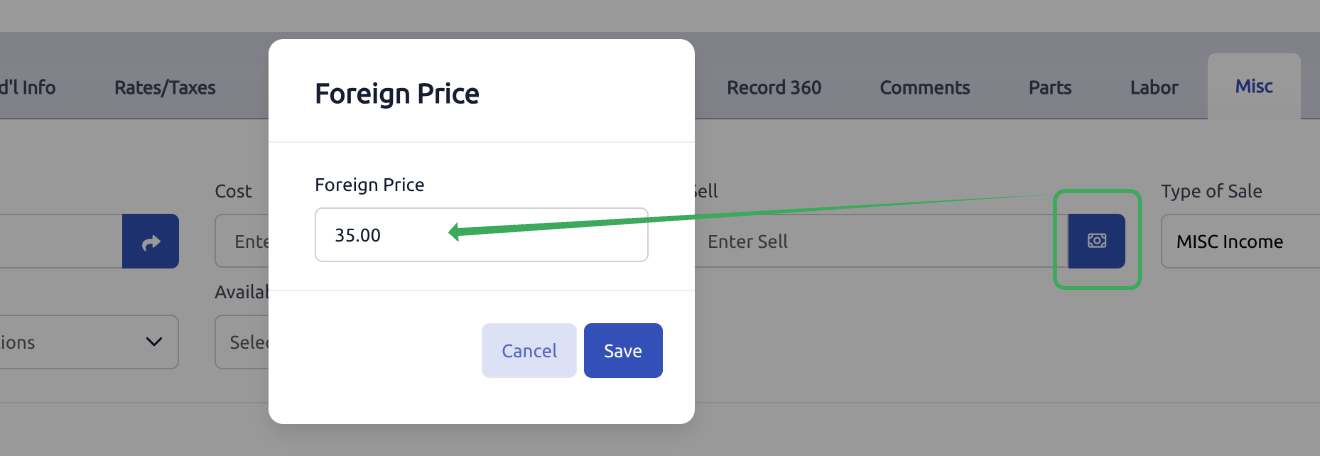
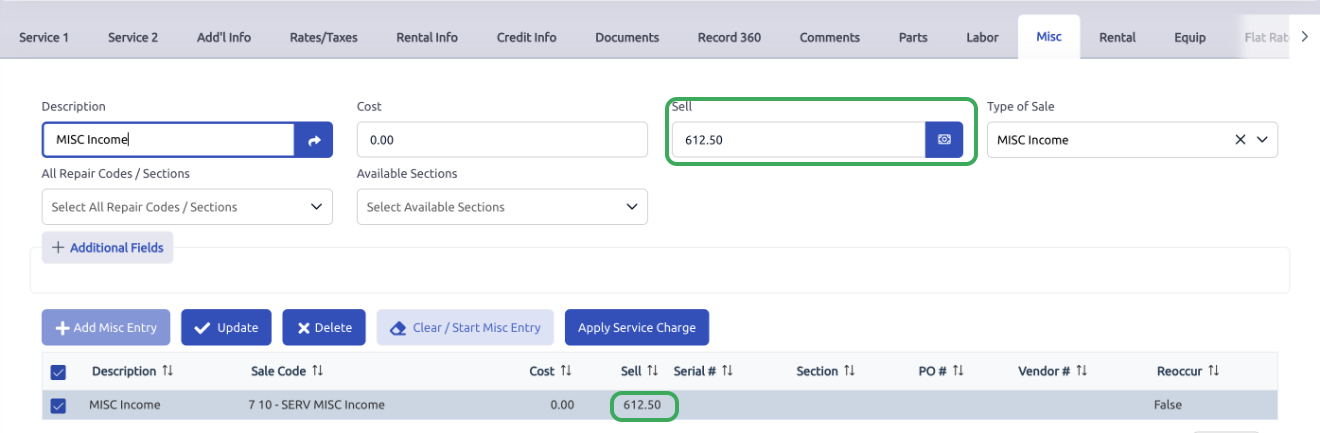
On the AR Invoice document, the user can enter the invoice line amount using one of two methods.
In this example, the user is adding a MISC line item to an invoice for a customer assigned to the USD currency type.
Step 2: Document Preview Translation
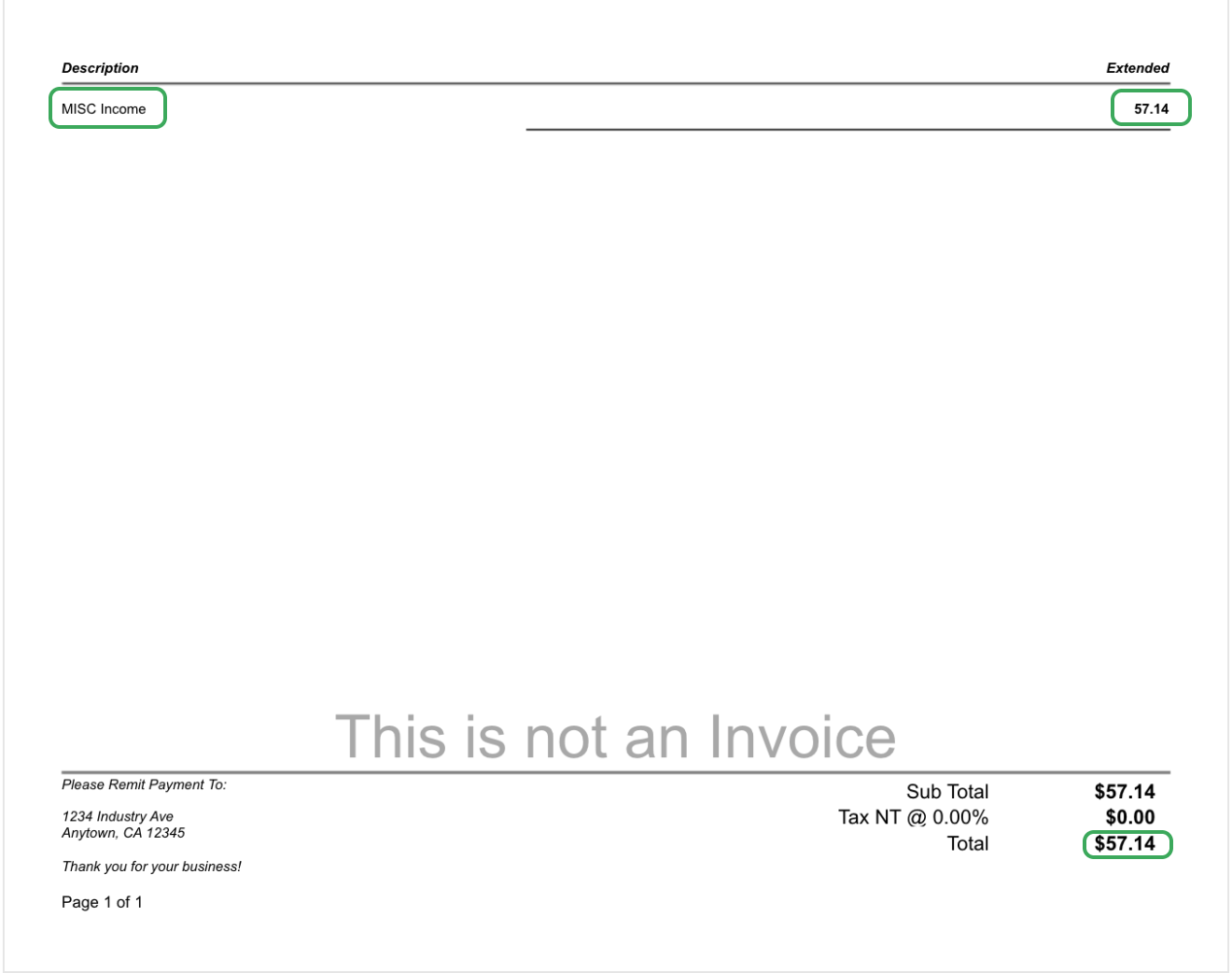
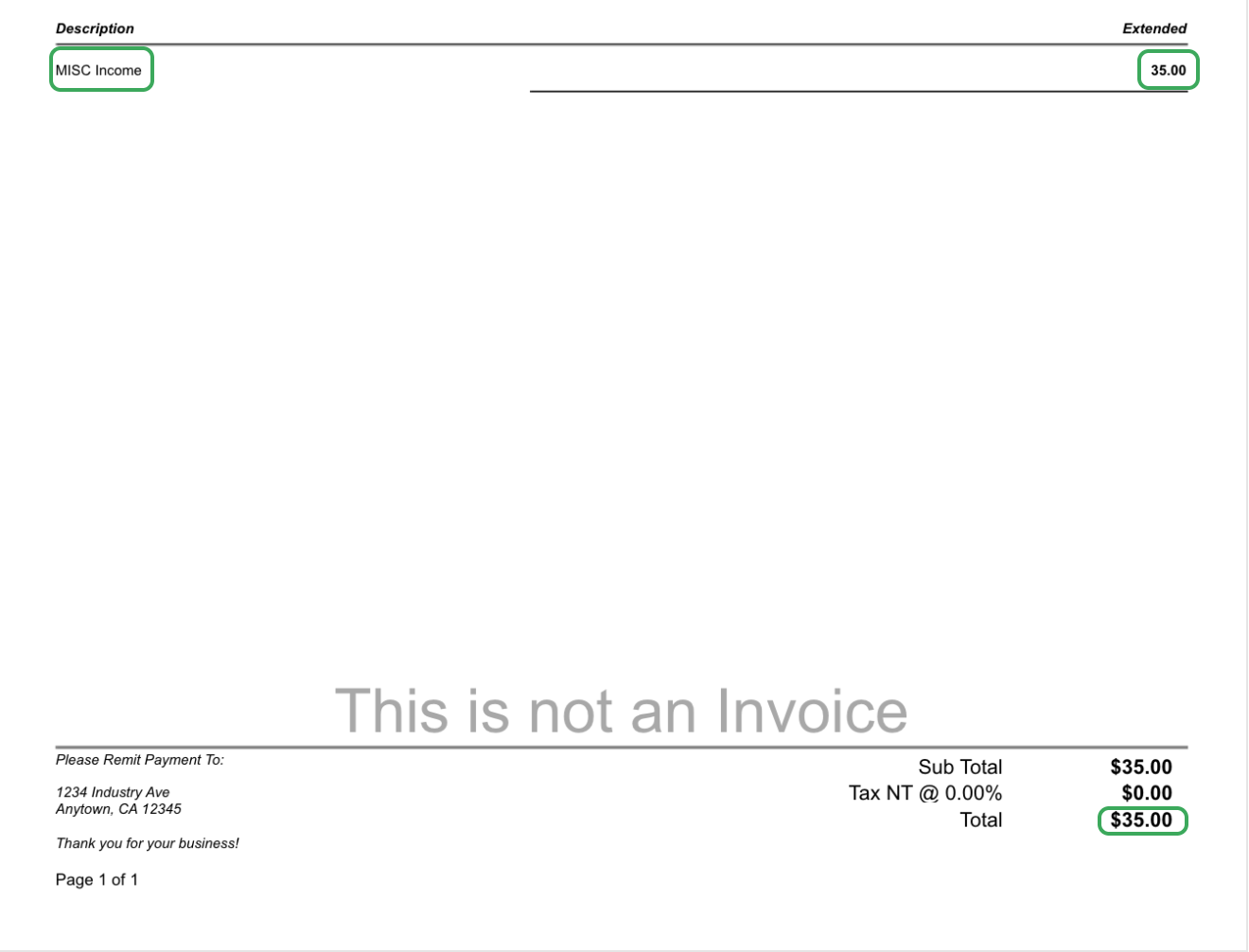
Using the example exchange rate:
1 USD = 17.5 MXN
Result
- Dealership enters: 1000 MXN
- Customer sees: 57.14 USD
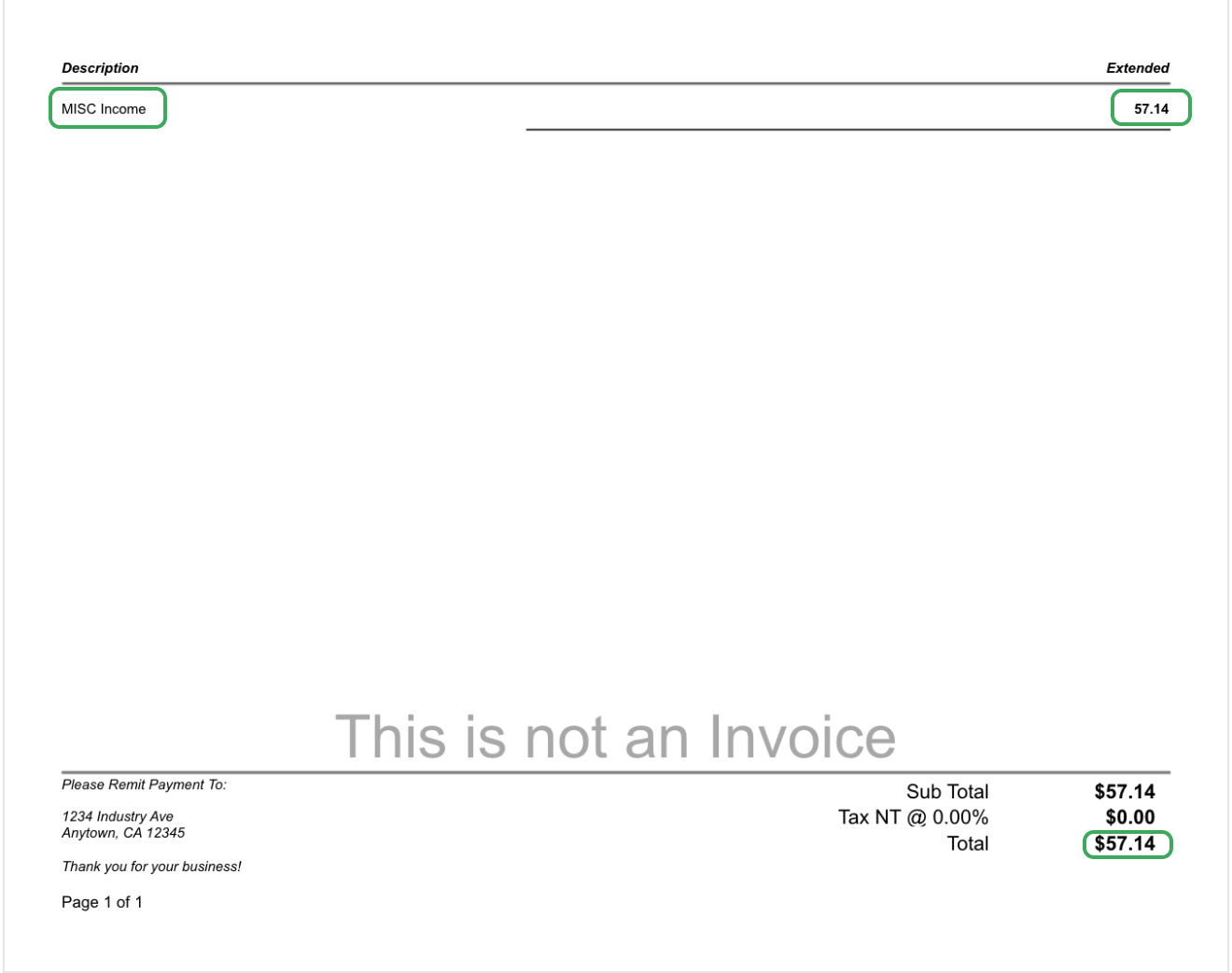
This allows the dealership to continue using its internal pricing structure in their base in this case MXN while presenting the invoice in the customer’s assigned currency amount.
Step 3: Account Distribution at Invoice Posting
For this example, the account distribution may appear like this:
- MISC Income = (1,000)
- A/R USD = 57.14
- A/R USD FX Adjustment = 942.86
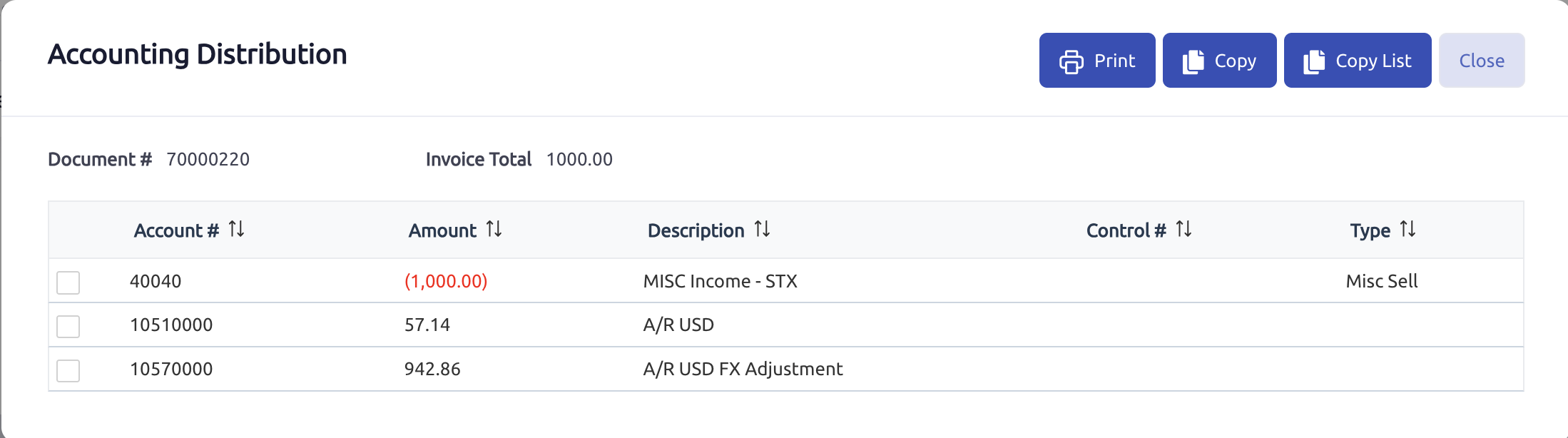
How to Read This Distribution
The key point is that the foreign AR account and the FX Adjustment account are intended to be read together.
Example
- A/R USD = 57.14
- A/R USD FX Adjustment = 942.86
Net:
- 1,000 MXN
Result
The customer-facing receivable is represented through the foreign AR structure, while the related FX Adjustment account bridges the difference between the foreign receivable amount and its base-currency value so that amount so the net effect ties back to the original base-currency value.
This is one of the most important points to understand in this setup.
Section 6: AR Inquiry
Purpose
AR Inquiry can be used to review the open receivable amount for the foreign-currency customer.
Example
Using the same invoice example:
- Entered amount = 1,000 MXN
- Customer-facing amount = 57.14 USD
AR Inquiry may show:
- 57.14 USD
 Result
This means AR Inquiry may reflect the foreign operational receivable amount.
Section 7: Balance Sheet Interpretation
Example
Using the same invoice example, the balance-sheet structure could conceptually appear as:
- A/R Base MXN = normal base-currency receivables
- A/R USD = 57.14
- A/R USD FX Adjustment = 942.86
Net:
- 1,000 MXN
Important Note
The foreign AR balance is not intended to be interpreted by looking at A/R USD alone.
Instead:
- A/R USD reflects the translated foreign amount
- A/R USD FX Adjustment bridges the difference between the foreign receivable amount and its base-currency value. Together, the A/R USD and A/R USD FX Adjustment accounts reflect the receivable’s original base-currency value.
Section 8: AR Deposit Workflow Example
Scenario
Assume the original invoice was created using the same USD customer example:
- Base amount entered on the invoice: 1,000 MXN
- Customer-facing invoice amount: 57.14 USD
Now assume the customer pays the invoice amount in USD:
- Payment amount: 57.14 USD
Since the invoice was issued for a customer assigned to a foreign currency type, the typical expectation is that the payment would also be received into a bank account assigned to that same currency type.
In this example, the payment is expected to be received into:
- 10450000 USD Bank Account
AR Deposit Entry Example
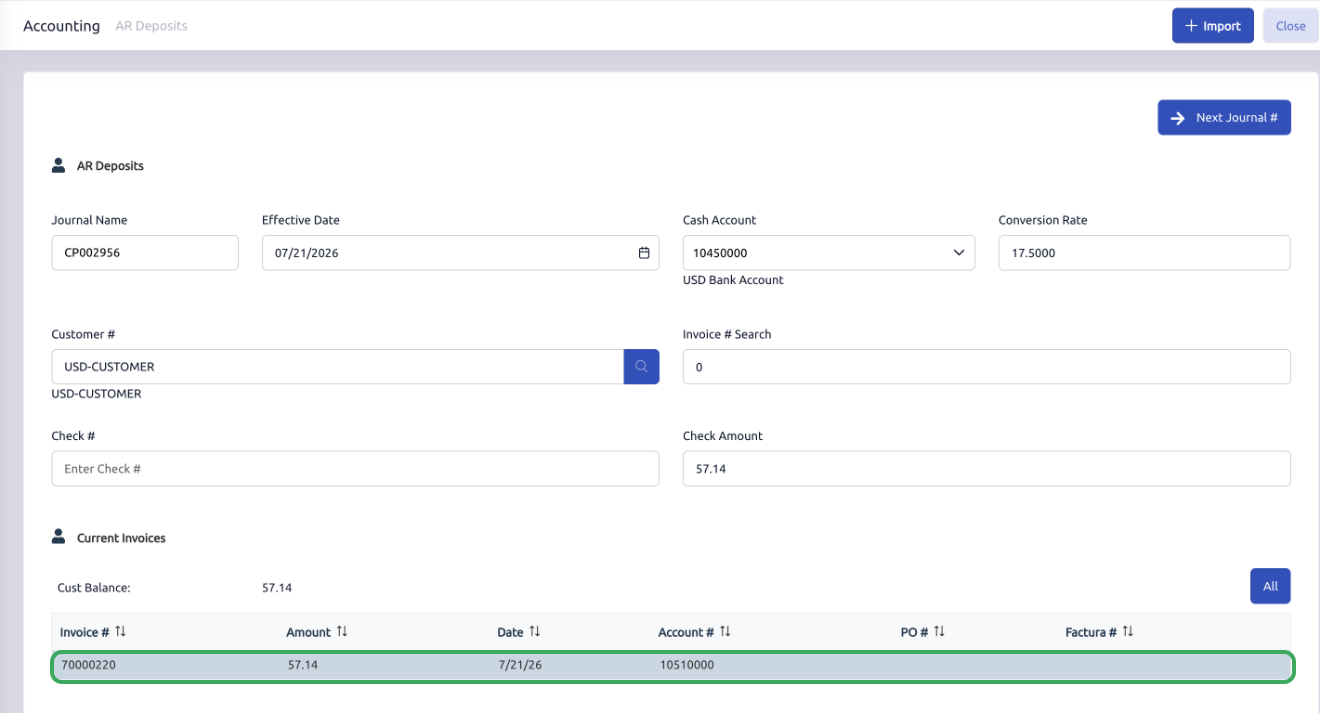
In AR Deposits, the user would typically:
- Click Next Journal # to assign the deposit journal number
- Select the related foreign bank account, such as 10450000 USD Bank Account
- Select the USD customer
- Enter the check number or payment reference
- Assuming full payment enter the payment amount of 57.14 USD
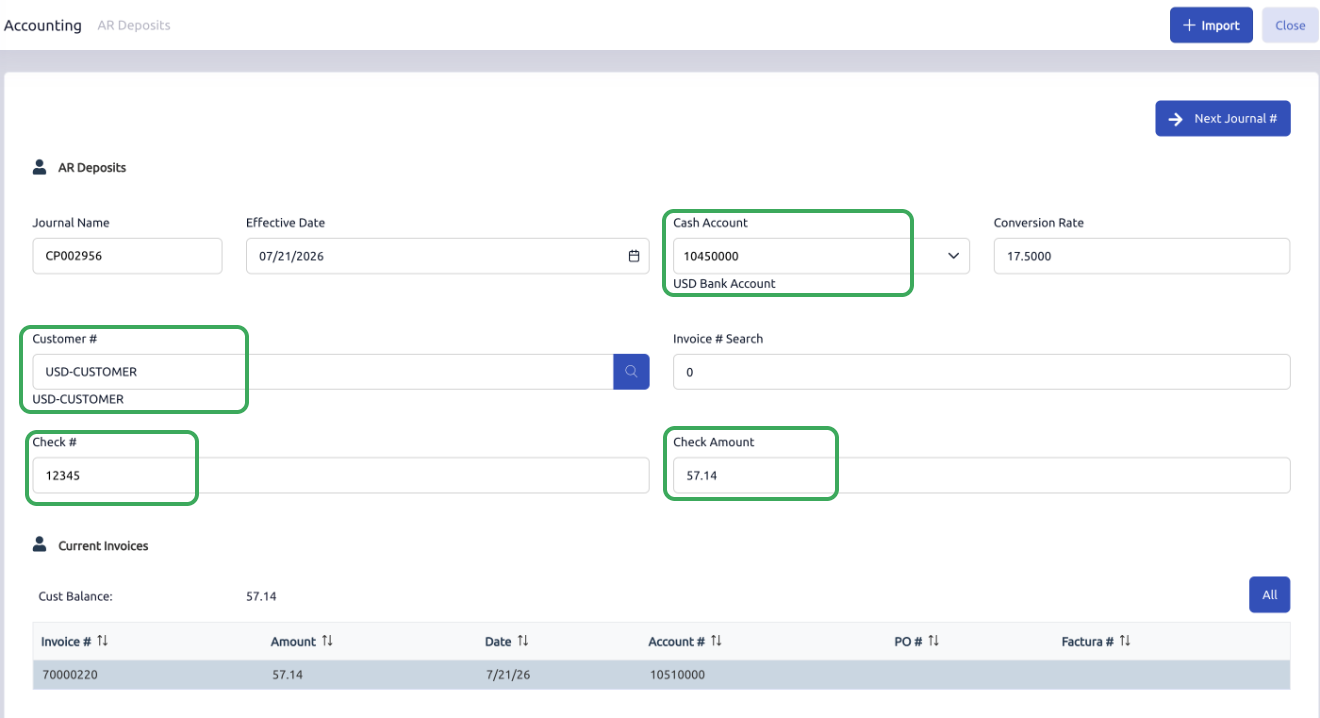
- Select the invoice being paid
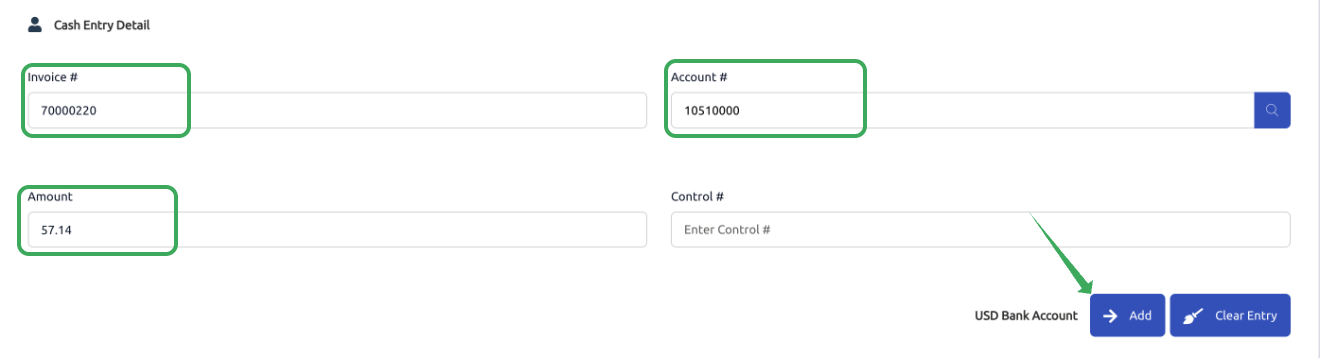
- Click Add in the Cash Entry Detail Section.
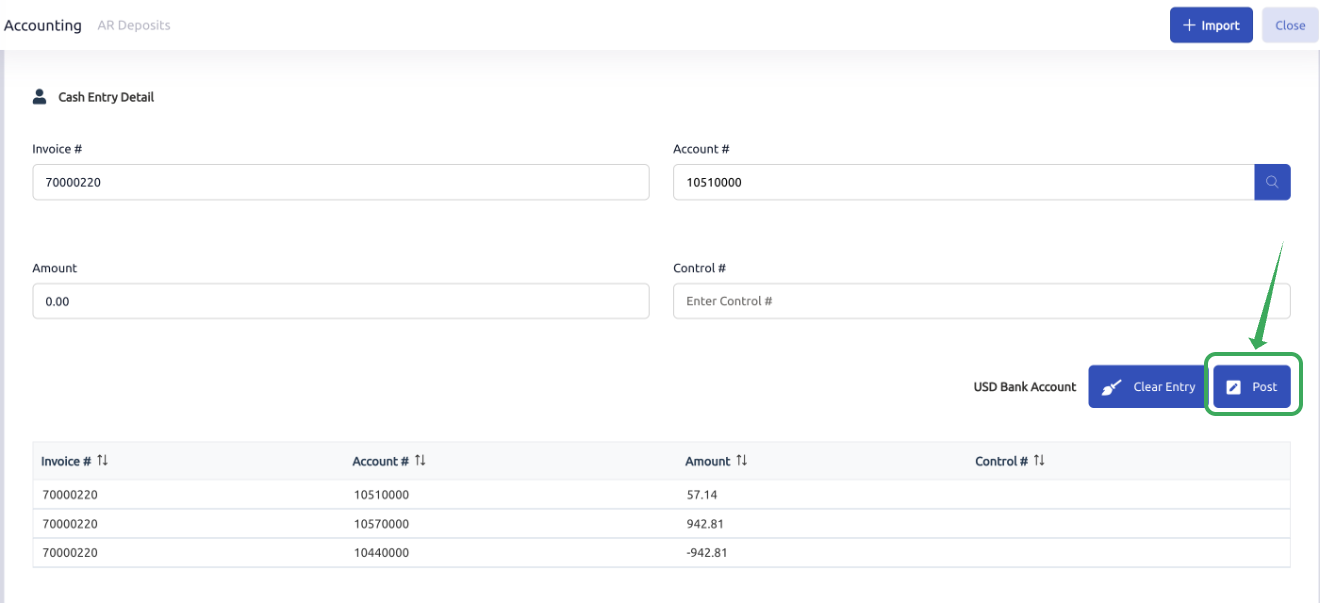
- Then Click Post to post the payment against the Invoice.
Expected Deposit Behavior
At deposit time, the general expectation is that:
- The foreign receivable is relieved
- The foreign cash is received into the related foreign bank account
- The related AR FX Adjustment account is also relieved
- The related Bank FX account may be used to keep the foreign bank activity aligned with the base-currency value
- Any exchange-related variance, if applicable, may flow to the Exchange Gains and Losses account
Example Posting Behavior
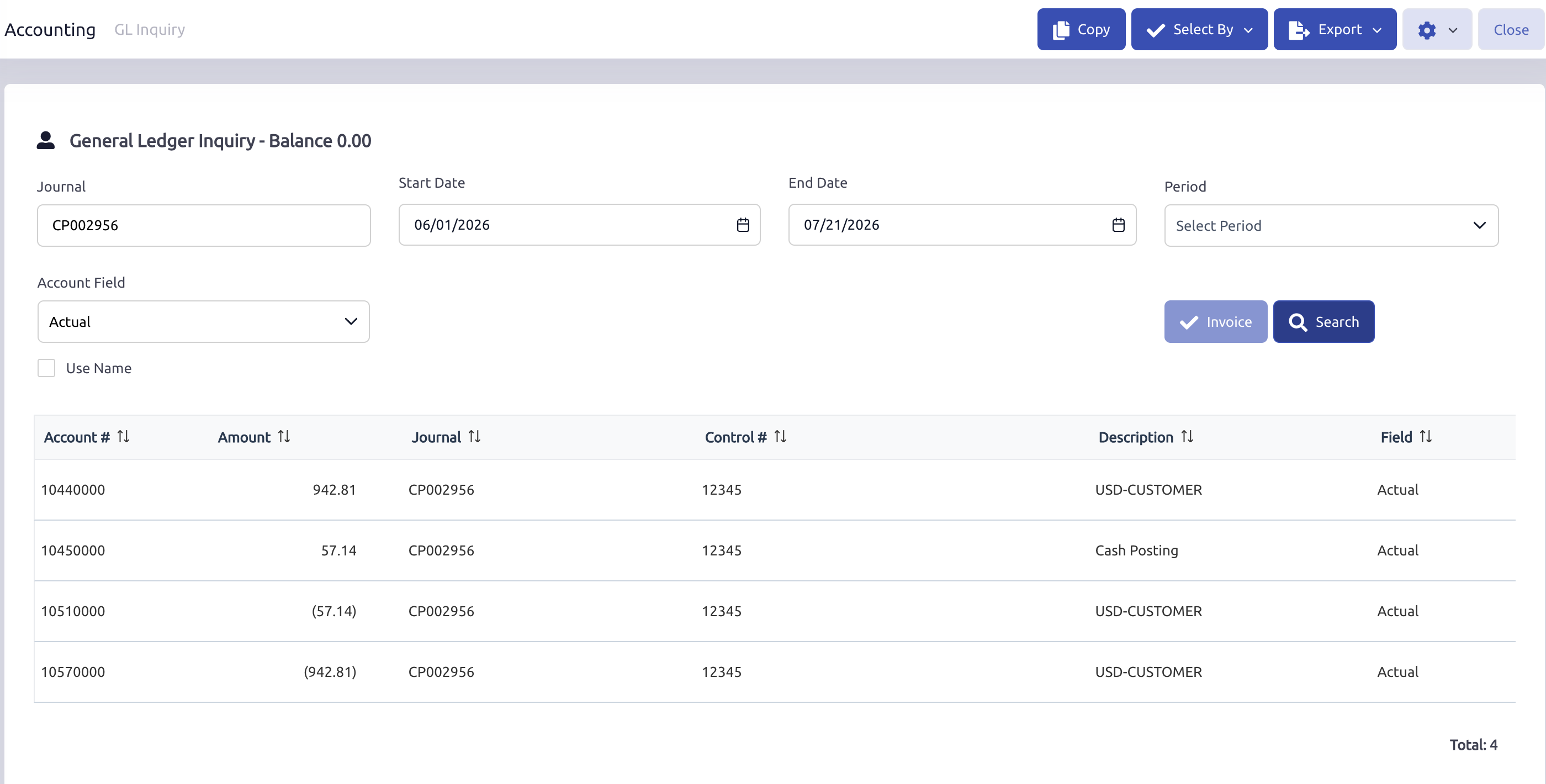
Using this example, the deposit posting may appear similar to the following:
- 10450000 USD Bank Account receives the foreign payment amount
- 10440000 USD Bank FX works with the related foreign bank account as part of the FX adjustment structure, helping the net accounting value tie back to the base currency
- 10510000 A/R USD is relieved for the foreign receivable amount
- 10570000 A/R USD FX Adjustment is relieved as part of the foreign AR structure
Result
The workflow remains aligned from invoice entry through payment:
- Customer receivable is tracked in USD
- Customer payment is received in USD
- USD cash is posted to the USD Bank Account
- The related FX Adjustment accounts support the base-currency accounting value
- Any settlement-related exchange variance may be recorded to 58050000 Exchange Gains and Losses, if applicable
This keeps the invoice, receivable, and payment activity tied to the customer’s assigned foreign currency while still supporting the dealership’s base-currency accounting structure in the general ledger.
Note: If the Exchange Rate Changes Before Payment
In some cases, the conversion rate may be different when the customer payment is received than it was when the invoice was originally posted.
In this example:
- The invoice was posted using a conversion rate of 17.50
- The customer-facing invoice amount was 57.14 USD
- At the original invoice rate, this represented 1,000.00 MXN
- The payment was later posted using a conversion rate of 18.00
- At the payment posting rate, the same 57.14 USD represented 1,028.52 MXN
Because the base-currency settlement value changed between invoice posting and payment posting, the system recognized the difference of 28.52
Depending on the setup and transaction details, this type of settlement-related exchange variance may be posted to the configured Exchange Gains and Losses account.
Example account:
- 58050000 Exchange Gains and Losses
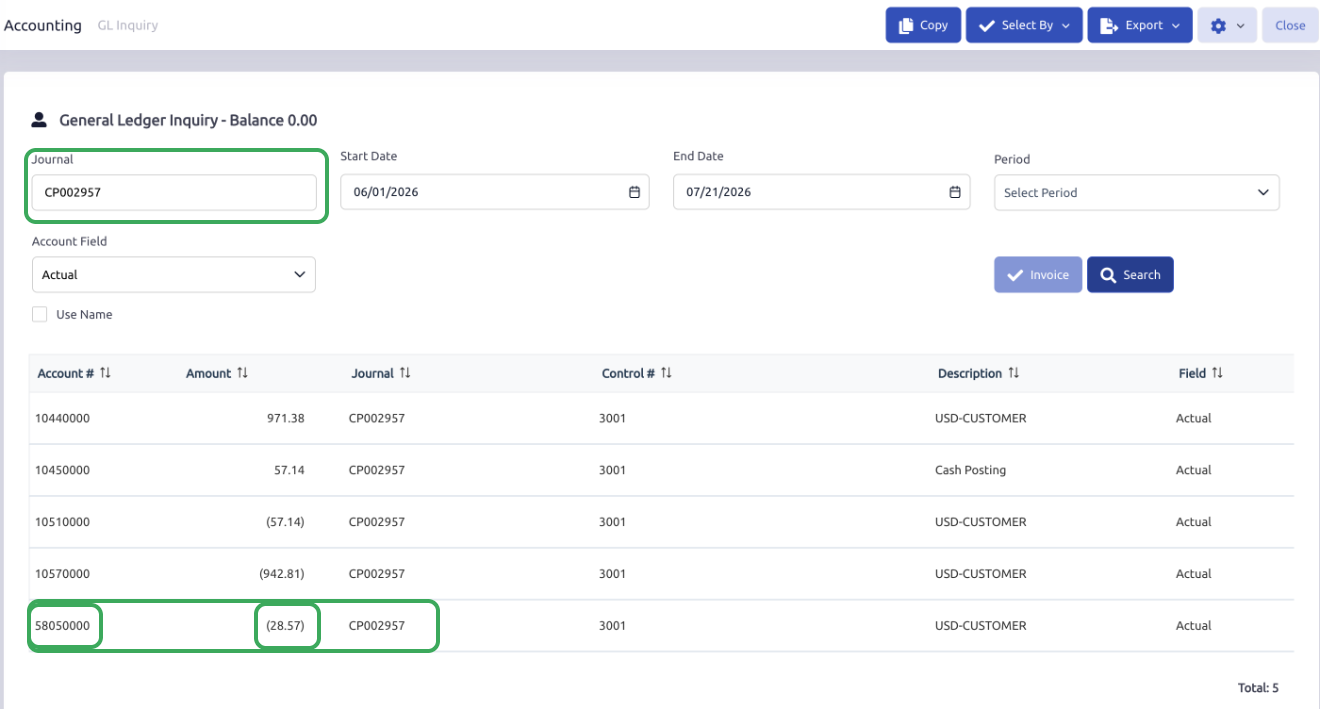
In this example, the posting to 58050000 Exchange Gains and Losses represents the settlement-related difference between the original invoice posting value and the payment posting value.
.
Section 9: Expected Behavior Summary
User Entry
- User enters document pricing in base currency MXN
Customer-Facing Document
- Document preview displays the translated USD amount
AR Invoice Behavior
- Revenue remains at the entered base amount
- A/R USD reflects the translated foreign amount
- A/R USD FX Adjustment works with the related foreign AR account as part of the FX adjustment structure
- The two AR accounts are intended to be interpreted together
AR Inquiry Behavior
- AR Inquiry may show the foreign receivable amount
AR Deposit Behavior
- Customer pays the foreign amount
- Payment is received into the matching foreign bank account
- Exchange-related variance may flow to the configured Exchange Gains and Losses account, if applicable
Section 10: Common Accounts Used in This AR Structure
The following accounts are commonly seen in this setup:
- 1000120 A/R Base MXN
Standard base-currency AR account - 10510000 A/R USD
Foreign AR account for USD customers - 10570000 A/R USD FX Adjustment
Related AR FX adjustment account - 10450000 USD Bank Account
Foreign bank account for USD receipts - 10440000 USD Bank FX
Related bank FX account - 58050000 Exchange Gains and Losses
Account used for exchange-related settlement variance
Part 2: AP Invoice and AP Payment
Summary
The system can also be configured to support vendors that transact in a foreign currency while the dealership continues maintaining its accounting structure in its base currency.
The example used here is a Mexico-based dealership that receives a vendor invoice in USD. In that workflow, the vendor invoice amount may be entered in USD, while the related inventory, expense, payable, and payment activity is supported through the related foreign currency accounts.
This section explains how that setup can be configured and how it functions within:
- AP Invoice Entry
- AP Payments
This section covers:
- AP-related COA setup
- Vendor setup
- AP Invoice Entry flow
- AP Invoice Distribution behavior
- AP Payment flow
- Example transaction behavior
Example Used in This Section
To keep the process consistent, this section uses the following example:
- Dealership base currency: MXN
- Vendor currency: USD
- Conversion rate: 17.50
- Vendor invoice amount: 100 USD
In this example:
- the dealership is based in the Mexico
- the vendor invoice is received in USD
- the invoice amount is entered in USD
- the system uses the related foreign AP account and AP FX Adjustment account to support the payable structure
Using this example:
100 USD × 17.50 = 1,750.00 MXN
This means the vendor invoice is entered for 100 USD, but the base-currency value of the invoice is 1,750.00 MXN.
Section 1: AP COA Setup
Purpose
The Chart of Accounts provides the accounts used by the foreign-currency payable structure.
For AP currency processing, the dealership would typically need:
- a foreign AP account
- a related AP FX Adjustment account
- a foreign bank account for payment
- an Exchange Gains and Losses account for settlement-related exchange variance, if applicable
For consistency with this article, these related adjustment accounts are referred to as FX Adjustment accounts.
Common AP Accounts Used
Foreign AP
20110000 Accounts Payable -USD
Type: Liability
Foreign AP FX Adjustment
20150000 AP USDFX Adjustment
Type: Liability
Foreign Bank
10450000 USDBank Account
Type: Asset
Foreign Bank FX Adjustment
10440000 USD Bank FX Adjustment
Type: Asset
Exchange Gain/Loss
58050000 Exchange Gains and Losses
Type: Expense
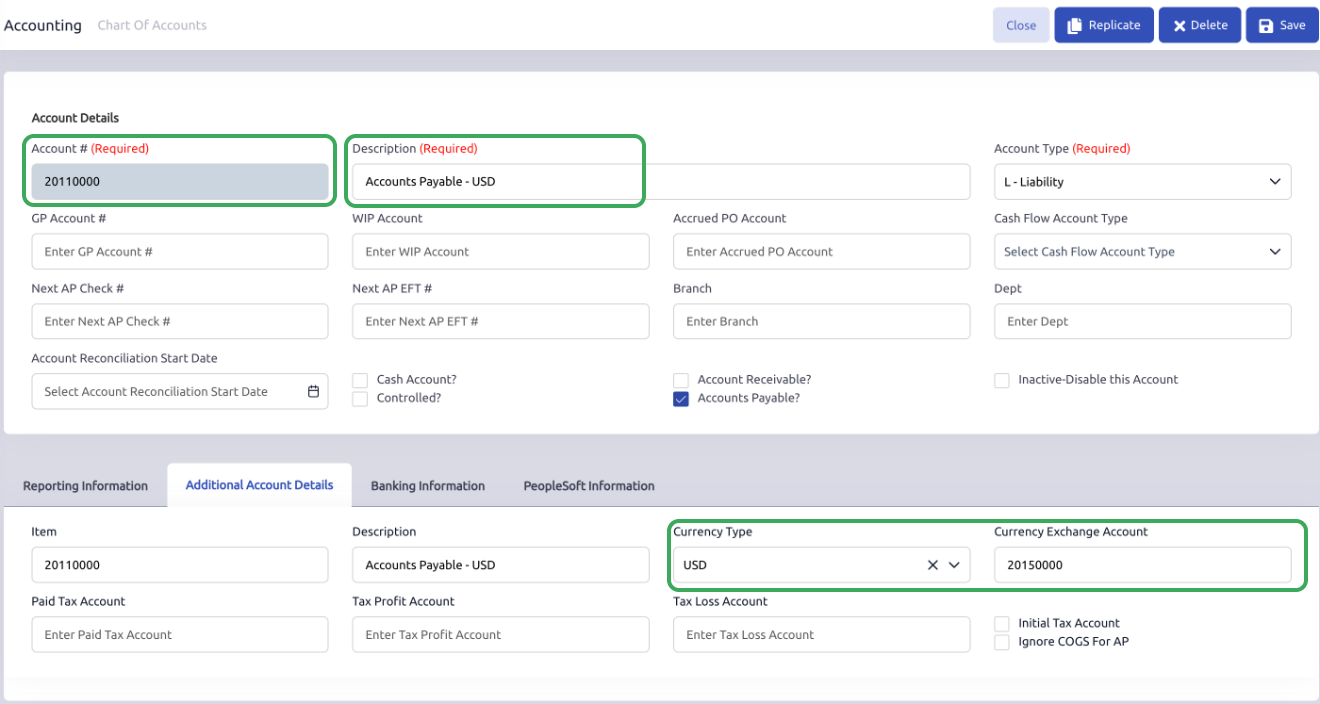
COA Setup Example for Accounts Payable - USD
On the foreign AP account:
20110000 Accounts Payable - USD (L)
the account would typically be assigned:
- Currency Type: USD
- Currency Exchange Account: 20150000 AP USD FX Adjustment (L)
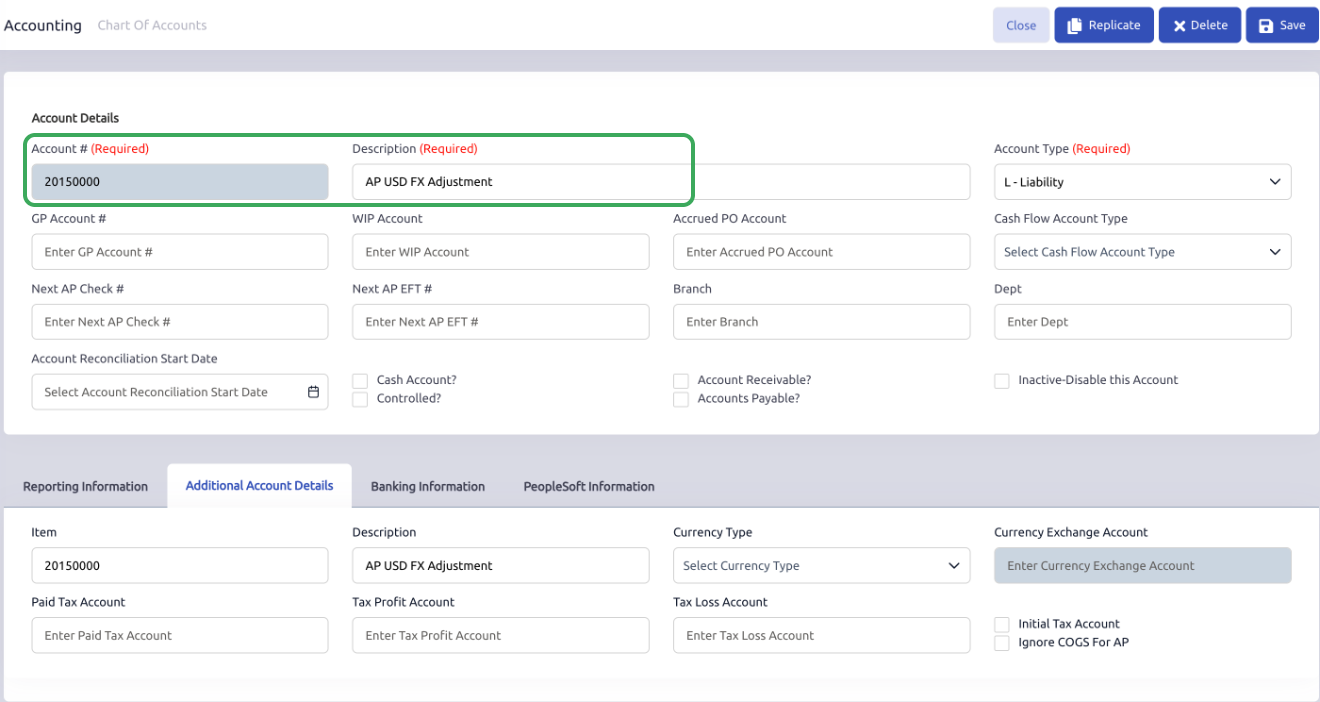
Account Setup Example for 20150000 AP USD FX Adjustment
How to Understand These Accounts
In this structure:
- Accounts Payable - USD represents the foreign payable side
- AP USD FX Adjustment works with that account as part of the translated AP structure
- USD Bank Account may be used when paying the vendor in USD
- USD Bank FX Adjustment may support the related foreign bank structure depending on setup and transaction behavior
- Exchange Gains and Losses may be used when a settlement-related exchange variance occurs
Because of that, the foreign AP account is not intended to be read entirely on its own. It works together with the related AP FX Adjustment account.
Section 2: Vendor Setup
Purpose
The vendor record identifies the vendor as a foreign-currency vendor.
Example Setup
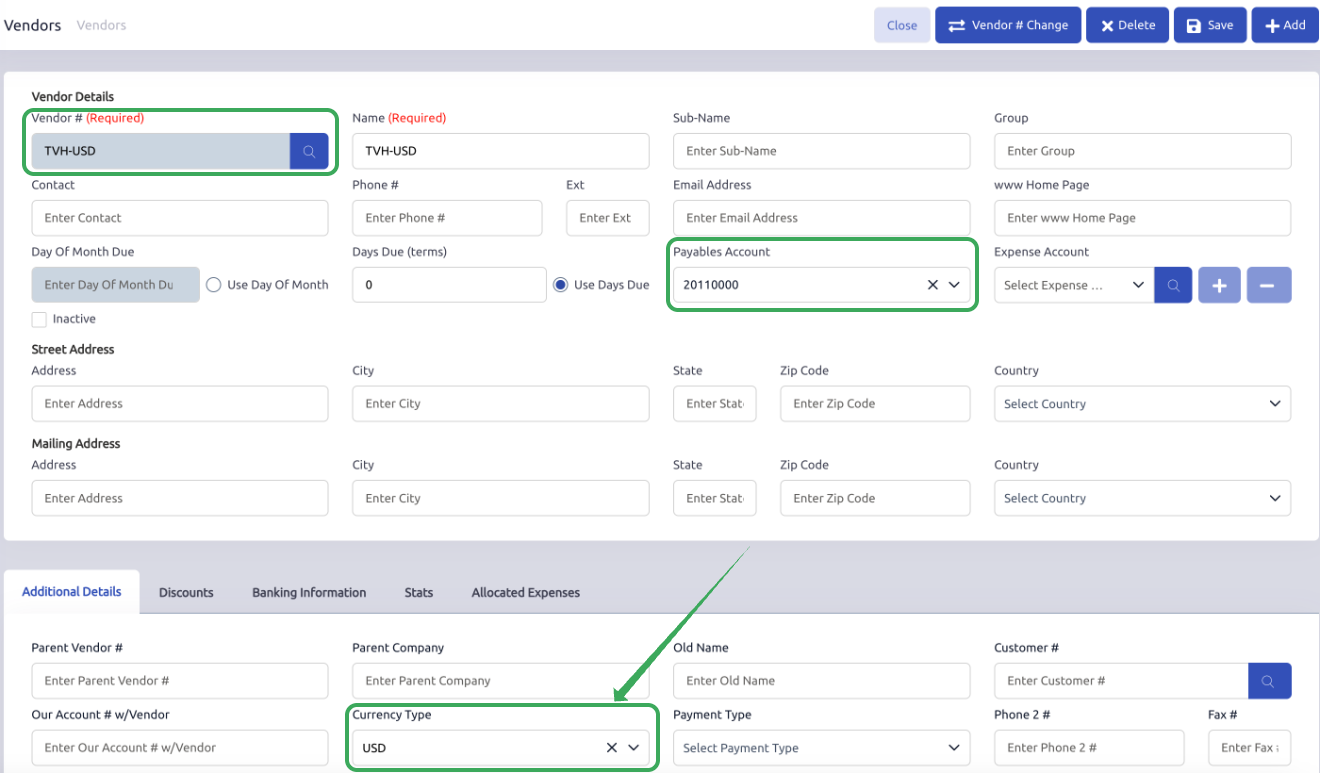
On the vendor record, under the Additional Details tab, set the Currency Type field to the related currency type.
Example:
- Vendor: TVH-USD
- Currency Type: USD
- Payables Account: 20110000 Accounts Payable - USD
 Result
Once the vendor is assigned to the USD currency type:
- AP Invoice Entry can use the vendor’s USD currency setup
- the USD payables account can be used for the vendor invoice
- the conversion rate can populate based on the assigned currency type
- the AP invoice can be entered using the vendor’s foreign currency amount
Section 3: AP Invoice Entry Workflow Example
Scenario
Assume the vendor sends an invoice for:
- Vendor: TVH-USD
- AP Invoice #: 12345
- Vendor invoice amount: 100 USD
- Conversion rate: 17.50
- Base-currency equivalent: 1,750.00 MXN
Step 1: User Enters the AP Invoice
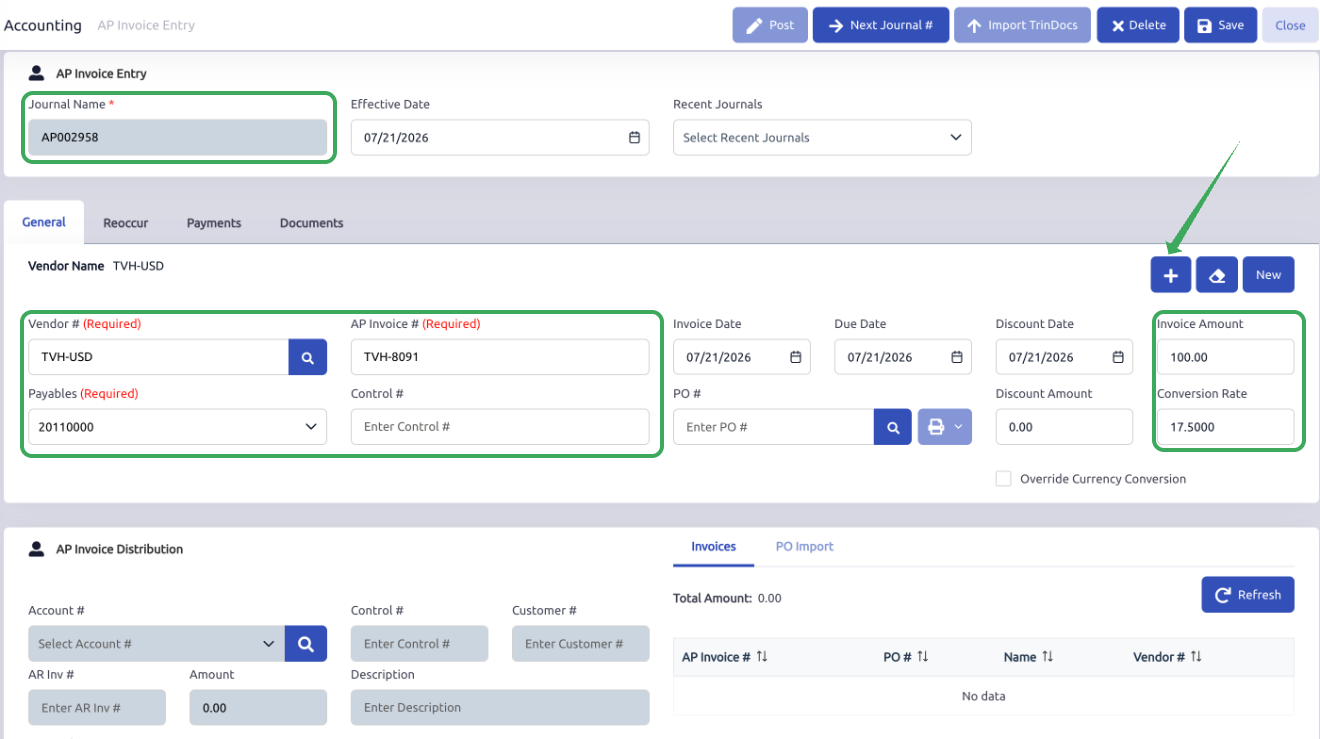
In AP Invoice Entry, the user would typically:
- Click Next Journal # to assign the AP journal number
- Select the vendor
- Enter the AP Invoice #
- Select the related USD payables account, such as 20110000 Accounts Payable - USD
- Enter the vendor invoice amount in the foreign currency
- Confirm the conversion rate
- Click the + icon to add the invoice
In this example, the vendor invoice amount is entered as:
- Invoice Amount: 100 USD
- Conversion Rate: 17.50
 Section 4: AP Invoice Distribution Example
Scenario
Assume the AP invoice is being distributed to Parts Inventory.
In this example:
- Foreign invoice amount: 100 USD
- Conversion rate: 17.50
- Base-currency equivalent: 1,750.00 MXN
- Distribution account: 120000 Parts Inventory
- AP FX Adjustment account: 20150000 AP USD FX Adjustment
Distribution Entry
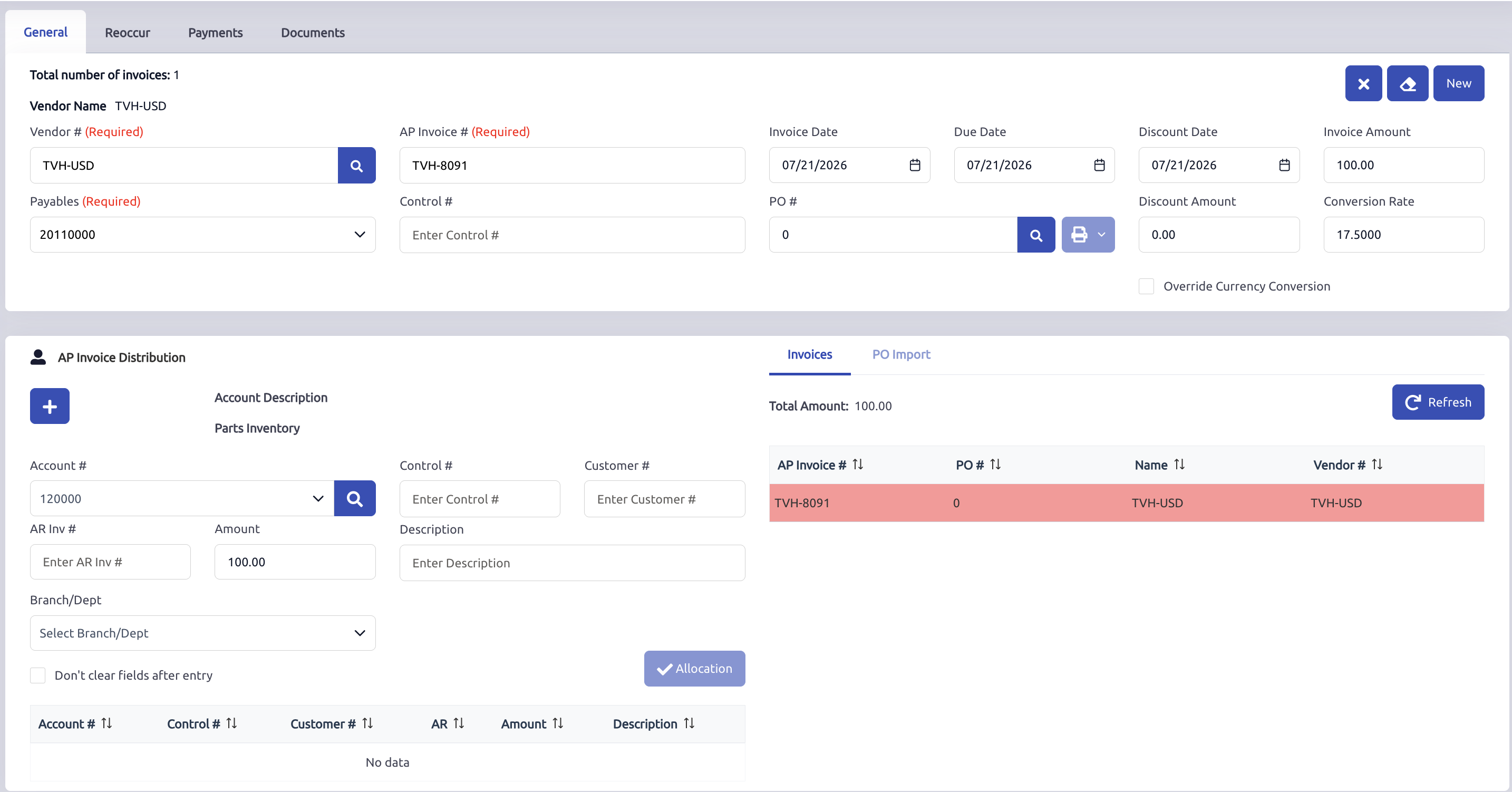
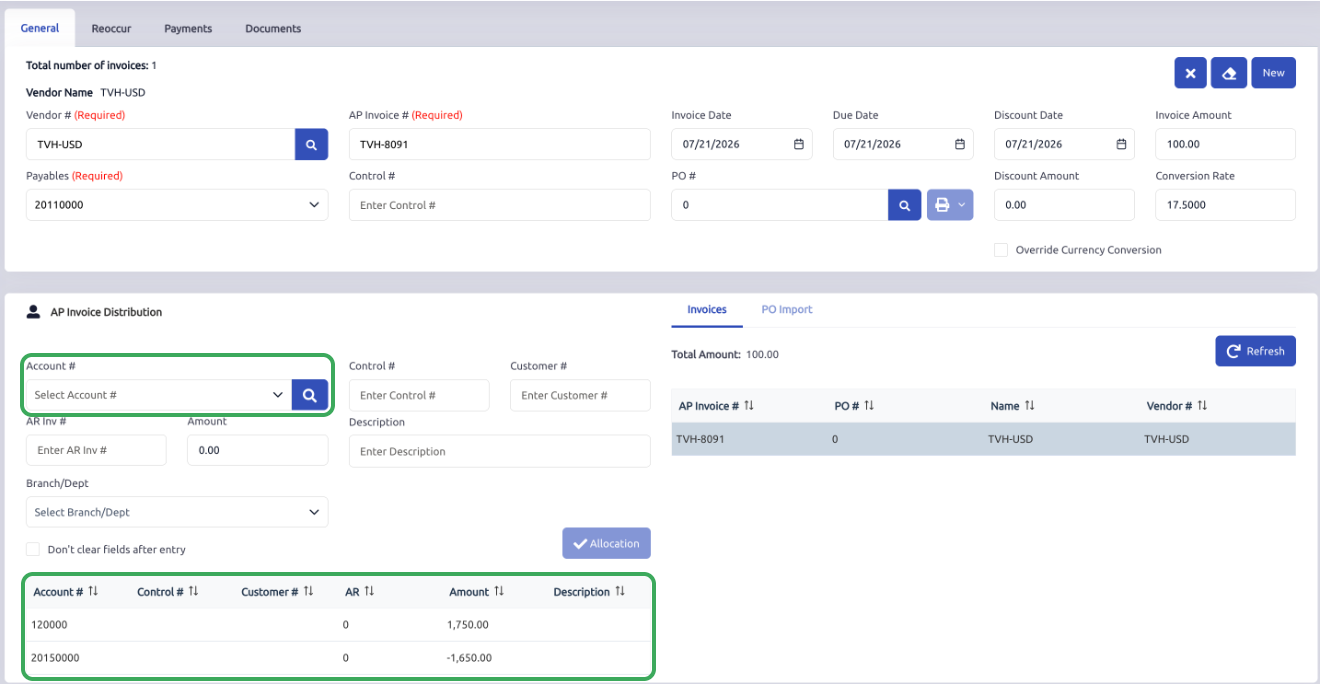
In the AP Invoice Distribution section, the user would typically:
- Select the distribution account ( In this case 120000 Parts Inventory )
- Click the "+" Icon to Apply the distribution
Using this example, the system shows:
- 120000 Parts Inventory = 1,750.00
- 20150000 AP USD FX Adjustment = (1,650.00)
How to Read This Distribution
The vendor invoice amount is entered as:
100 USD
The conversion rate is:
17.50
The base-currency equivalent is:
100 × 17.50 = 1,750.00 MXN
In this example, the distribution to Parts Inventory is for the base-currency value of the invoice:
- 120000 Parts Inventory = 1,750.00 MXN
The related AP FX Adjustment account works with the foreign AP account as part of the foreign payable structure:
- 20150000 AP USD FX Adjustment = (1,650.00)
Conceptually, the foreign AP account and the related AP FX Adjustment account work together.
Example:
- Accounts Payable - USD = (100.00) USD
- AP USD FX Adjustment = (1,650.00)
- Net base-currency accounting value = (1,750.00 MXN)
The Accounts Payable - USD account represents the 100.00 USD owed to the vendor. The AP USD FX Adjustment account bridges the difference between the foreign payable amount and its base-currency value.
Together, the two payable accounts reflect a total liability of 1,750.00 MXN, which balances the 1,750.00 MXN debit posted to Parts Inventory.
Section 5: Account Distribution at AP Invoice Posting
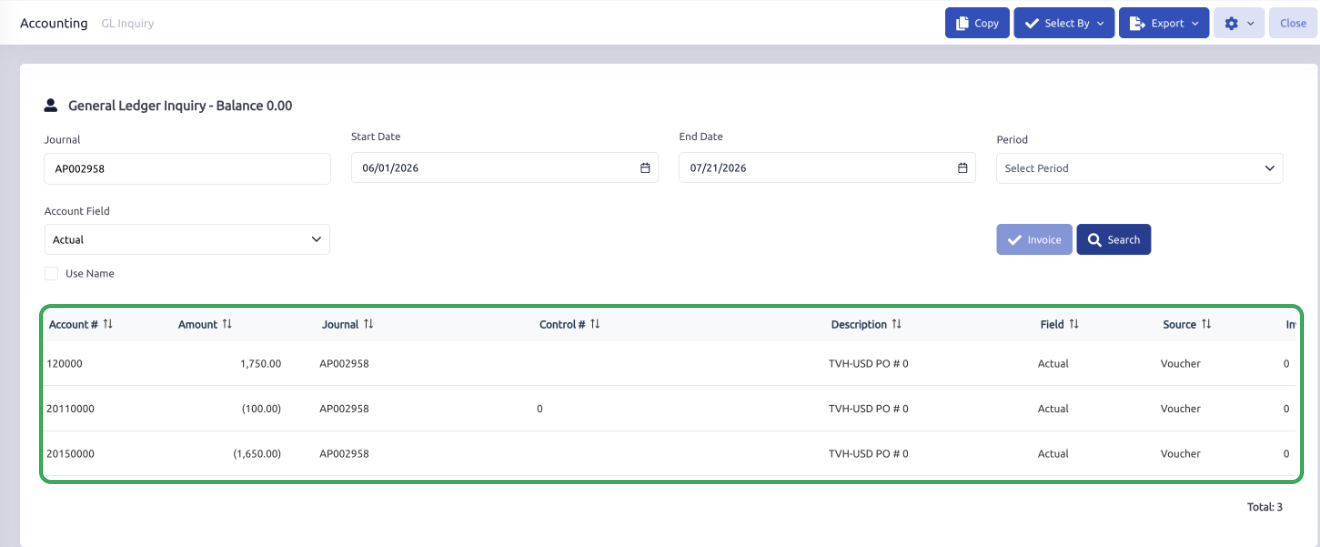
For this example, the AP invoice posting may appear similar to the following:
- 120000 Parts Inventory = 1,750.00
- 20110000 Accounts Payable - USD = (100.00)
- 20150000 AP USD FX Adjustment = (1,650.00)
How to Read This Posting
The Parts Inventory account is posted for the base-currency value of the invoice.
The Accounts Payable - USD account reflects the foreign vendor payable amount.
The AP USD FX Adjustment account works with the foreign AP account as part of the FX adjustment structure, helping the combined accounting value tie back to the base currency.
Conceptually:
- AP USD = (100.00)
- AP USD FX Adjustment = (1,650.00)
- Combined AP value = (1,750.00 MXN)
This combined value ties back to the 1,750.00 MXN base-currency distribution amount posted to Parts Inventory.
This is one of the most important points to understand in this setup. The foreign AP account should not be interpreted entirely on its own. It is intended to be reviewed together with the related AP FX Adjustment account.
Section 6: AP Payment Workflow Example
Scenario
Assume the original AP invoice was created using the same USD vendor example:
- Vendor invoice amount: 100USD
- Base-currency equivalent at invoice entry: 1,750.00 MXN
- Payables account: 20110000 Accounts Payable - USD
Now assume the vendor is being paid in USD.
Since the invoice was entered for a vendor assigned to a foreign currency type, the typical expectation is that the payment would also be made from a bank account assigned to that same currency type.
In this example, the payment is made from:
- 10450000 USD Bank Account
AP Payment Entry Example
In AP Payments, the user would typically:
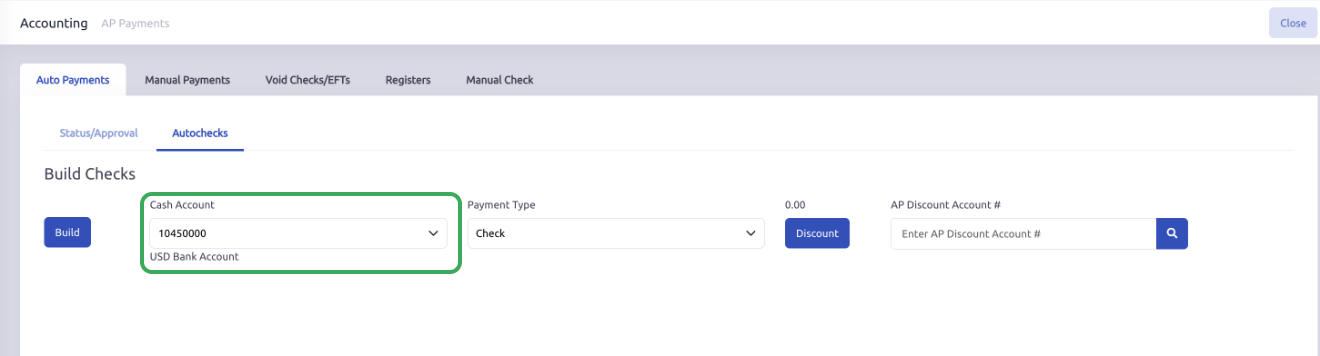
- Locate the vendor
- Select the related foreign bank account, such as 10450000 USD Bank Account
- Select the AP invoice being paid
- Enter or confirm the payment amount
- Post the payment against the AP Invoice
Section 7: AP Payment Posting Behavior
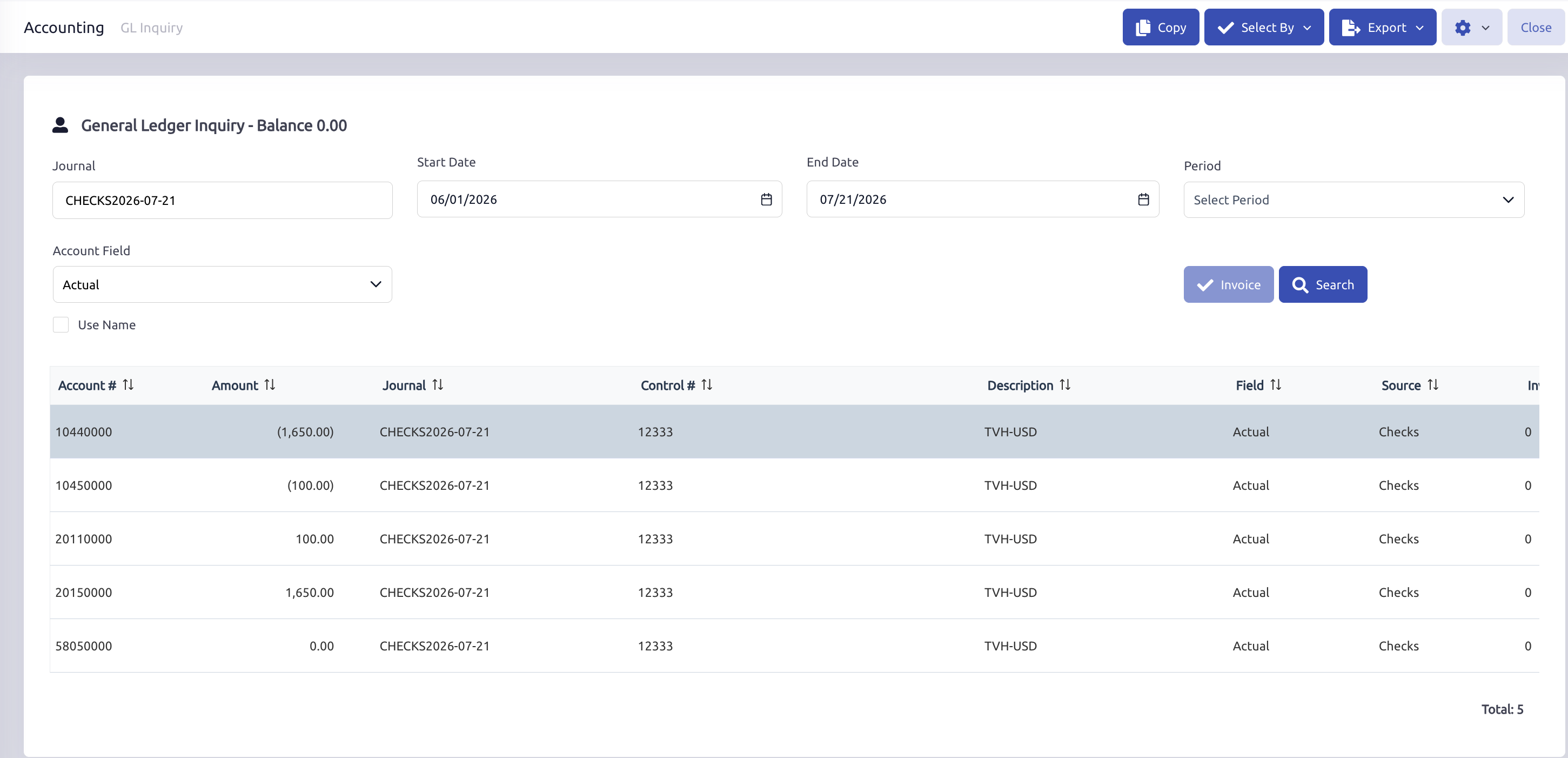
Using this example, the AP Payment posting may appear similar to the following:
- 10440000 USD Bank FX Adjustment = (1,650.00)
- 10450000 USD Bank Account = (100.00)
- 20110000 Accounts Payable - USD = 100.00
- 20150000 AP USD FX Adjustment = 1,650.00
- 58050000 Exchange Gains and Losses = 0.00
How to Read This Posting
The payment reduces the USD Bank Account by the 100.00 USD paid to the vendor.
The USD Bank FX Adjustment works with the foreign bank account so that the combined reduction in cash equals the base-currency value of 1,750.00 MXN.
At the same time, the payment relieves the foreign payable and its related AP FX Adjustment:
- Combined USD Bank and Bank FX Adjustment = (1,750.00 MXN)
- Combined Accounts Payable - USD and AP FX Adjustment = 1,750.00 MXN
This shows that a payment of 100.00 USD, with a base-currency value of 1,750.00 MXN, was made from the USD bank account and applied to the original foreign AP invoice.
Because the same Conversion Rate of 17.50 was used for both the AP invoice and payment, no exchange gain or loss was recognized.
Section 8: Note: If the Exchange Rate Changes Before Payment
In some cases, the Conversion Rate may change between the time the AP invoice is posted and the time the payment is made.
In this example:
- The AP invoice was entered for 100.00 USD.
- The invoice was posted using a Conversion Rate of 17.50 MXN per USD.
- The original base-currency value was 1,750.00 MXN.
- The payment was later posted using a Conversion Rate of 18.00 MXN per USD.
- At the payment rate, the same 100.00 USD had a base-currency value of 1,800.00 MXN.
- The system recognized an exchange loss of 50.00 MXN.
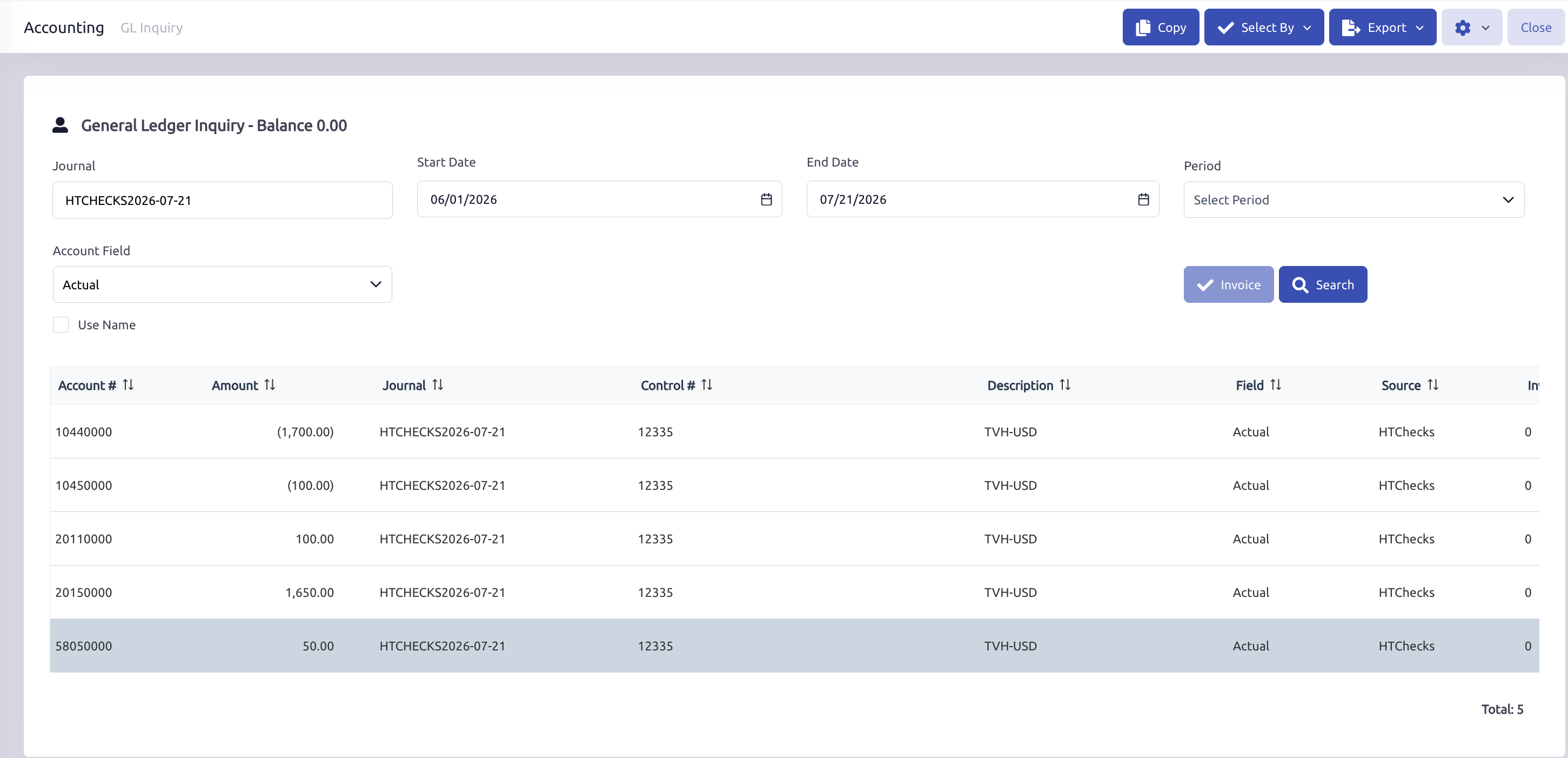
Because the USD increased in value relative to the MXN, the dealership needed an additional 50.00 MXN to settle the original 100.00 USD invoice.
In this example, the exchange loss was posted to the configured Exchange Gains and Losses account.
Example account:
- 58050000 Exchange Gains and Losses
The account records the settlement-related difference between the original AP invoice posting rate and the AP payment rate. Account numbers and names may vary depending on the dealership’s configuration.
Section 9: Expected Behavior Summary
Vendor Setup
- The vendor is assigned to the applicable foreign Currency Type.
- The vendor can use the related foreign AP account.
- In this example, the vendor is assigned to USD and uses the Accounts Payable - USD account.
AP Invoice Behavior
- The user enters the vendor invoice amount in USD.
- The system applies the assigned Conversion Rate to calculate the MXN base-currency value.
- Inventory and expense accounts are posted using the MXN value.
- The Accounts Payable - USD account reflects the amount owed to the vendor in USD.
- The AP USD FX Adjustment bridges the difference between the USD payable and its MXN value.
- The Accounts Payable - USD and AP USD FX Adjustment accounts should be reviewed together.
AP Payment Behavior
- The vendor payment is typically made from a bank account assigned to USD.
- The USD Bank Account reflects the amount paid in USD.
- The USD Bank FX Adjustment works with the bank account to reflect the payment’s MXN value.
- The payment relieves both the Accounts Payable - USD and AP USD FX Adjustment accounts.
- If the same Conversion Rate is used for the invoice and payment, no exchange gain or loss is recognized.
- If the Conversion Rate changes before payment, the settlement difference may be posted to the configured Exchange Gains and Losses account, depending on the dealership’s setup and the transaction details.
Section 10: Common Accounts Used in This AP Structure
The following accounts are commonly seen in this setup:
20110000 Accounts Payable - USD
Foreign AP account for USD vendors
20150000 AP USD FX Adjustment
Related AP FX adjustment account
10450000 USD Bank Account
Foreign bank account for USD payments
10440000 USD Bank FX Adjustment
Related bank FX adjustment account
58050000 Exchange Gains and Losses
Account used for exchange-related settlement variance
120000 Parts Inventory
Example distribution account used in the AP invoice example
Key Takeaways
- The vendor invoice amount can be entered in the vendor’s foreign currency.
- The system uses the assigned Conversion Rate to calculate the base-currency equivalent.
- Distribution accounts reflect the base-currency value of the AP invoice.
- The foreign AP account and its related AP FX Adjustment should be reviewed together.
- The AP Payment relieves the foreign payable and its AP FX Adjustment while reducing the related foreign bank account and Bank FX Adjustment.
- If the Conversion Rate changes between AP invoice posting and payment, the settlement difference may be posted to the configured Exchange Gains and Losses account, depending on the dealership’s setup and the transaction details.
Was this article helpful?
That’s Great!
Thank you for your feedback
Sorry! We couldn't be helpful
Thank you for your feedback
Feedback sent
We appreciate your effort and will try to fix the article